
Amplified Landline Phone for Seniors
3.9Editor score
100dB ringer volume
Photo speed dial buttons
80dB receiver gain
This guide compares the top captioned telephones for hearing impaired users featuring real-time captions, amplified sound, and user-friendly designs for clear
Navigating the world of telecommunications can be challenging for those with hearing loss. Captioned telephones offer a unique solution by combining audio with real-time text, ensuring no word is missed during important conversations with family and friends.
We have evaluated ten leading models based on clarity, ease of use, and accessibility features. Our analysis focuses on devices that provide reliable captioning services, amplified audio options, and intuitive interfaces tailored for seniors and hard-of-hearing individuals.
Each selection highlights specific strengths such as large screens, volume control, and compatibility with hearing aids. Please note that product availability and pricing can fluctuate frequently, so verify current details before making your final purchase decision.
3.9Editor score

4.3Editor score

4.1Editor score
The following table provides a side-by-side comparison of all ten selected products to help you quickly identify the model that best fits your specific hearing and communication needs.




The Hamilton CapTel 2400iSPNBT stands out as a top choice for individuals seeking reliable captioned telephony. It combines a large touchscreen interface with real-time captioning technology to ensure every word is visible during calls.
We may earn a commission when you buy through this link, at no additional cost to you.
This model offers significant amplification up to forty decibels which helps users hear callers clearly even in noisy environments. The built-in answering machine also displays voicemail captions allowing users to review messages at their convenience.
While the device requires high-speed internet for captioning services this is a minor trade-off for the clarity it provides. The interface is straightforward making it accessible even for those who are not tech-savvy.
This phone is ideal for seniors or anyone with hearing loss who needs both audio and visual confirmation of conversations. It effectively bridges the gap between hearing and reading during daily phone interactions.
The captioning service converts spoken words into text instantly so you never miss a detail in important conversations.
Users can adjust caption size and tone controls to fit their specific comfort level and reading preferences.
We may earn a commission when you buy through this link, at no additional cost to you.
The Geemarc Ampli550 is designed specifically for those who need extreme volume amplification and tactile feedback. It delivers up to fifty-five decibels of sound which is significantly louder than standard phone models.
We may earn a commission when you buy through this link, at no additional cost to you.
Key features include a talking keypad that announces buttons as they are pressed and a talking caller ID. This auditory assistance is invaluable for users with visual impairments or those who struggle with standard dial pads.
While it lacks the captioning technology of other models on this list its sound quality and alerts are superior. The extra-large buttons and emergency keys add a layer of safety and ease of use for elderly individuals.
Consider this phone if your primary need is volume and audible confirmation rather than text transcription. It serves as a robust and reliable communication tool for hard-of-hearing users in home settings.
Talking keys and caller ID ensure you know exactly what you are dialing and who is calling without looking.
An extra bright flashing strobe and loud ringer prevent missing incoming calls even when in another room.
We may earn a commission when you buy through this link, at no additional cost to you.
The Captel MDL 200 offers a basic approach to captioned telephony for users seeking simplicity. It is a corded device designed to handle standard calls with some assistance for those with hearing loss.
We may earn a commission when you buy through this link, at no additional cost to you.
While detailed specifications are not available in the provided data this model serves as an entry-level option. It likely includes core captioning functionality without the advanced features of newer smart devices.
The lack of extensive data points means users should verify features before purchasing. However for those who want a no-nonsense phone for voice calls this might suffice for basic needs.
This phone is suitable for individuals who prefer traditional hardware over complex interfaces. It provides a functional solution for staying connected without the learning curve of modern touchscreens.
Focuses on core calling features to ensure reliable communication without unnecessary complications.
A cost-effective choice for those needing fundamental assistance in telephone interactions.
We may earn a commission when you buy through this link, at no additional cost to you.
The Clarity AltoPlus is an amplified phone certified to meet standards for mild to severe hearing loss. It provides up to fifty-three decibels of amplification to ensure voices are heard clearly during conversations.
We may earn a commission when you buy through this link, at no additional cost to you.
Features like talking keypad and visual ring indicators make it accessible for users with combined hearing and vision challenges. The ergonomic tone and volume controls are designed for ease of use even for those with arthritis.
While it does not offer captioning it excels in sound clarity and accessibility compliance. The outgoing speech amplification feature ensures your voice is also heard clearly by the caller on the other end.
This model is an excellent choice for those prioritizing sound quality over text display. It is particularly well-suited for individuals who use hearing aids and need a device that works seamlessly with their existing equipment.
Controls are shaped to accommodate users with limited dexterity ensuring comfort during extended calls.
Combines audio and visual alerts to support users with multiple sensory impairments effectively.
We may earn a commission when you buy through this link, at no additional cost to you.
The Serene Innovations SI-CL-65 provides a cordless solution for seniors who need mobility around their home. It features high definition audio and a talking caller ID system to enhance the calling experience.
We may earn a commission when you buy through this link, at no additional cost to you.
The inclusion of an answering machine adds convenience for managing incoming messages without needing to answer every call. This is particularly useful for those who may feel overwhelmed by frequent calls.
While detailed features are not listed the focus on high definition and talking IDs suggests a strong emphasis on clarity. This makes it a viable option for those who prefer wireless handsets over traditional corded phones.
Consider this device if you need a phone that allows movement while talking. It simplifies communication by providing clear audio and automated support for incoming calls.
Cordless design allows users to move freely while staying connected to family and friends.
Built-in answering machine ensures important messages are captured and organized automatically.
We may earn a commission when you buy through this link, at no additional cost to you.
The VTech SN5147 is a hybrid system offering both a corded base and a cordless handset for versatile communication. It includes a robust set of features like photo speed dial and a call blocker to manage unwanted contacts.
We may earn a commission when you buy through this link, at no additional cost to you.
Features like a ninety decibel ringer and visual indicators ensure calls are noticed even in loud environments. The answering machine allows for message recording with remote access which adds to its utility.
While it lacks captioning the volume control and speed dial features are significant for seniors. The photo dial slots allow users to store pictures of contacts making it easier to call family members.
This phone is ideal for users who want both mobility and reliability. It combines modern features like call blocking with traditional amplification to meet the needs of older adults.
Store pictures of loved ones to call them instantly with a single touch of a button.
Block up to one thousand numbers to reduce spam and ensure only important calls get through.
We may earn a commission when you buy through this link, at no additional cost to you.
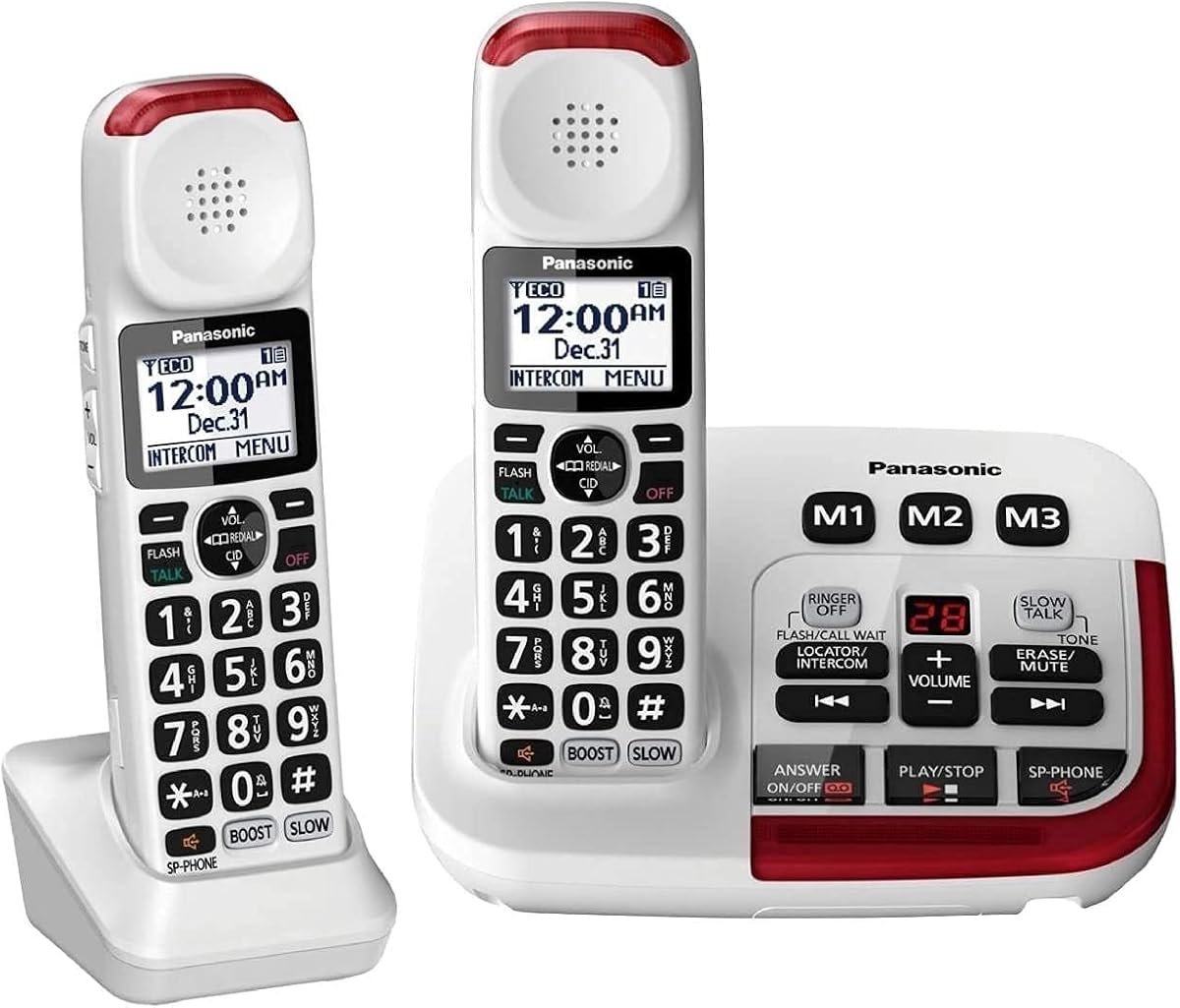
The Panasonic KX-TGM420W bundle includes a base unit and handset designed to improve clarity in noisy environments. It features noise reduction technology that suppresses background interference for more comfortable conversations.
We may earn a commission when you buy through this link, at no additional cost to you.
The slow talk feature is a standout addition that slows speech speed during message playback. This helps users better understand recorded messages without straining to process fast talking voices.
With volume boost up to forty decibels this phone amplifies voices significantly. The talking keypad and visual LED ringers provide multi sensory alerts to ensure no call is missed.
This bundle is suitable for households that need multiple handsets. It offers a comprehensive communication solution with features tailored for seniors and those with mild hearing loss.
Slows down voice messages to make them easier to understand for hearing impaired users.
Reduces background noise to focus on the caller's voice for clearer communication.
We may earn a commission when you buy through this link, at no additional cost to you.
The SWISSVOICE Big Button Phone is designed to simplify communication through visual cues and large buttons. It includes photo memory slots so users can see a picture of who they are calling.
We may earn a commission when you buy through this link, at no additional cost to you.
An SOS button is included for emergencies providing peace of mind for seniors and their families. The phone is hearing aid compatible and offers adjustable ringer volume to suit different preferences.
While it lacks advanced captioning the photo dial makes it very accessible for those with memory issues. It provides a direct visual link to contacts making dialing simple and reliable.
This phone is ideal for elderly users who rely on visual memory. It offers essential features like call blocking and emergency contacts to ensure safety and ease of use.
Attach photos to buttons so you know exactly who you are calling just by looking.
Dedicated SOS button allows quick access to emergency services when needed.
We may earn a commission when you buy through this link, at no additional cost to you.
This Panasonic bundle offers a larger system capable of supporting up to six handsets for whole home coverage. It shares many features with the two handset version but provides greater flexibility for multi room use.
We may earn a commission when you buy through this link, at no additional cost to you.
The intercom feature allows communication between handsets which is useful for large homes. Like the other models it includes voice boost and noise reduction to ensure calls are clear.
The visual ringers on both base and handset help identify ringing phones visually. This is helpful when hearing aids reduce environmental sound perception or if the phone is in another room.
Consider this bundle if you need multiple handsets around the house. It provides a comprehensive solution for keeping the whole family connected with senior-friendly features.
Multiple handsets ensure you can answer calls from any room in the house.
Quickly contact other handsets without using phone lines for internal communication.
We may earn a commission when you buy through this link, at no additional cost to you.
This amplified landline phone focuses on delivering high volume and simple usability at an accessible price point. It features a hundred decibel ringer which is loud enough to alert users in any environment.
We may earn a commission when you buy through this link, at no additional cost to you.
Photo buttons allow for quick dialing of family members making it easy to stay connected. The visual flash indicator ensures that even if the ringer is turned down a call is still visible.
It includes speakerphone functionality for hands free use which is beneficial for those with mobility issues. The design is straightforward with large buttons suitable for those with arthritis or low vision.
This model is a strong budget choice for seniors who need loud volume and simplicity. It avoids complex features to focus on reliable communication and ease of use.
Bright LED flashing ensures you are aware of calls even in bright or noisy conditions.
Store photos on buttons to contact family members without needing to remember numbers.
We may earn a commission when you buy through this link, at no additional cost to you.
Choosing the right telephone involves evaluating several technical and usability factors to ensure it meets your specific hearing and lifestyle needs.
Captioned telephones rely on internet connectivity to convert speech into text. Check if the device supports high speed Wi Fi or needs a wired connection. Verify the service requirements such as US residency to ensure you qualify for the captioning service.
Ensure the device meets internet needs for real time captions to work effectively without delay.
Hearing loss varies from mild to severe so look for adjustable volume settings. Devices with decibel ratings of forty dB or higher provide clearer audio for those with moderate to severe loss.
Select a phone with variable gain control to customize the loudness to your comfort level.
Flashing lights and strobe alerts are crucial for users who might miss a ring. Large backlit screens and extra large buttons help those with vision issues dial and read caller information easily.
Prioritize models with visual ring indicators to ensure you never miss an incoming call.
Many modern phones are designed to work seamlessly with hearing aids through induction loops. Check for TIA certification or T coil compatibility to avoid feedback and ensure clear audio transmission.
Choose a device explicitly marked as hearing aid compatible to prevent audio interference.
Corded phones often work during power outages while cordless models offer mobility around the home. Hybrid systems allow you to keep a base unit for reliability and a handset for convenience.
Decide between fixed location and mobility based on your daily routine and home layout.
Look for phones with large tactile buttons and simple menus. Talking keypads are an excellent feature for those who struggle to see the numbers or remember which button does what.
Select a model with an intuitive layout to reduce frustration during daily use.
Built-in answering machines with visual cues and speed dial memory buttons add significant value. Photo dialing allows you to store images for quick contact access which is helpful for cognitive health.
Consider devices with memory features to simplify dialing and message management.
While some models are more expensive their features like noise reduction and captioning may justify the cost. Balance your budget against the essential features you need to communicate effectively.
Compare the included features against the price to find the best value for your specific situation.
To start using a captioned telephone ensure it is connected to both power and the internet. Register your account with the captioning service provider if required to activate the text features.
Adjust the volume and caption size settings to match your preferences. Test the device by making a practice call to a friend or family member to verify that both sound and text appear correctly.
Regularly update the software if the device supports it to maintain optimal performance. Keep the phone and buttons clean with a soft cloth to ensure the keypad remains responsive over time.
Most modern captioned phones require a high-speed internet connection to generate real-time text captions. Without internet you may still use the phone for voice calls but the text display feature will not function.
Many models on this list are hearing aid compatible with T-coil support to reduce interference. Always check the specific compatibility details in the product specifications before purchasing.
Corded phones stay in one place and often work during power outages while cordless phones allow you to move around the house. Some sets include both for flexibility and reliability.
Amplified phones can offer volume boosts from forty decibels up to ninety or one hundred decibels. This allows users to adjust the sound to a level where they can hear clearly.
Standard captioned landline phones are designed for voice calls only. For video calls you would need a different device or app that supports both video and captioning features.
Captioning services are often free for eligible users with hearing loss in the US. However some devices may have monthly fees or require specific registration steps to activate the feature.
The Hamilton CapTel 2400iSPNBT leads our list for its comprehensive captioning features and user-friendly design. For those prioritizing volume the Geemarc Ampli550 and Amplified Landline Phone offer exceptional sound levels.
When choosing a phone consider your specific hearing needs whether they are visual tactile or auditory. Features like photo dialing and talking keys can significantly improve daily communication ease.
Prices and availability change frequently so verify the current details before buying. These tools are essential for maintaining strong connections with loved ones despite hearing challenges.