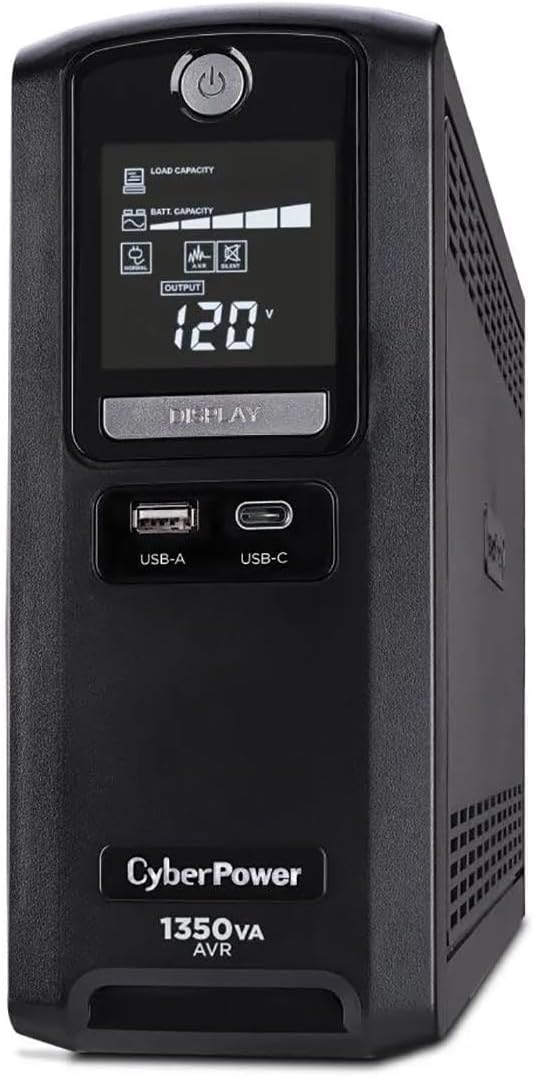
CyberPower CST135UC
4.9Editor score
1350VA Simulated Sinewave
10 Outlets plus Data Protection
Energy Star Certified Design
This guide compares the top 10 Battery Backup for Small Office models by capacity, surge protection, and runtime to help you choose the right UPS for your
Power outages can disrupt critical business operations and lead to significant data loss for small office environments. A reliable Battery Backup for Small Office ensures your computers, routers, and peripherals stay online during unexpected interruptions.
We evaluated ten top-rated uninterruptible power supplies based on their output capacity, waveform type, outlet configuration, and included management software. Our analysis focuses on models that balance performance with affordability for daily office use.
Each pick highlights specific strengths like sine wave output or automatic voltage regulation. Prices fluctuate frequently so check current listings before purchasing to ensure you get the best value for your specific power needs.
4.9Editor score

4.5Editor score

4.5Editor score
The following table provides a side-by-side comparison of all ten reviewed models to help you quickly identify the right unit for your small office setup.


The CyberPower CP1500PFCLCD stands out as the premier choice for small offices requiring high-quality power protection. Its 1500VA capacity combined with a pure sine wave output ensures compatibility with active PFC power supplies often found in modern servers and workstations. This model delivers reliable performance that protects your hardware from damage during brownouts or spikes.
We may earn a commission when you buy through this link, at no additional cost to you.
One of its strongest features is the inclusion of twelve NEMA 5-15R outlets, split between battery backup and surge protection. This generous connectivity allows you to plug in multiple devices without needing extension cords. Additionally, the color LCD panel provides detailed, real-time information about load levels and battery health which is crucial for proactive maintenance.
While it offers robust protection, the unit is heavier than simpler models due to the battery capacity required for high output. The price is also higher than basic standby units but the investment pays off by safeguarding expensive equipment. It is a professional grade solution rather than a basic consumer toy.
This unit is ideal for IT managers or small business owners who need reliable power for desktops routers and network attached storage. The included software helps manage power events remotely which is a valuable feature for unattended environments. For critical office hardware this model offers the best balance of power quality and connectivity available today.
The pure sine wave output ensures that sensitive electronics receive clean power similar to what you get from the main grid. This prevents potential damage that can occur with modified sine wave outputs commonly found in cheaper units.
The color LCD screen makes it easy to monitor your UPS health at a glance. It alerts you to issues like low battery or overload conditions before they cause a system shutdown.
We may earn a commission when you buy through this link, at no additional cost to you.
The CyberPower CST135UC earns its premium status through exceptional energy efficiency and comprehensive data protection features. With a 1350VA rating it provides ample power to keep your office essentials running during short term outages. Its standout feature is the inclusion of network and coaxial line protection which is often overlooked in standard models.
We may earn a commission when you buy through this link, at no additional cost to you.
This unit is certified by Energy Star indicating it consumes less power during normal operation compared to many competitors. This helps reduce your overall energy bill while still providing robust backup capabilities. The ten outlets offer good flexibility for connecting a mix of devices without cluttering your workspace.
The simulated sine wave output is sufficient for most standard power supplies but might not be ideal for high-end servers with active PFC requirements. However for a general small office setup it is more than adequate. The user-friendly management software allows for easy monitoring and shutdown sequences.
If you rely heavily on internet connectivity or use coaxial cables for TV or internet this model is a top choice. It ensures that not just your computer but also your networking gear is protected from surges traveling through cables. It is a strong premium option for offices needing reliable and efficient power backup.
Protecting your data lines is just as important as protecting your power lines. This UPS includes specific protection against surges traveling through network cables which can fry your router or modem.
Being Energy Star certified means this unit operates at a high efficiency level. It reduces wasted electricity when plugged in which adds up over the long term for office environments.
We may earn a commission when you buy through this link, at no additional cost to you.
The APC BE600M1 is an excellent entry-level option for small offices that need basic protection without breaking the bank. It provides reliable surge protection and battery backup for essential devices like your computer and router. Its simplicity and affordability make it a popular choice for home offices and small workspaces.
We may earn a commission when you buy through this link, at no additional cost to you.
One of the most practical features of this model is the easy battery replacement system. Instead of discarding the entire unit when the battery dies you can simply swap out the internal battery cartridge. This extends the life of the UPS and is better for the environment compared to buying a new device.
The runtime is sufficient for saving your work and shutting down safely during a short outage but it is not designed for long duration support. The seven outlets are well spaced to accommodate bulky plugs but you might find yourself limited if you have many devices. The included USB port is handy for keeping your phone charged during an emergency.
For those on a tight budget who still want brand reliability this unit is hard to beat. It covers the basics effectively and is perfect for protecting a single workstation setup. If your office has minimal equipment this model provides the essential safety net you need.
The ability to replace just the battery keeps costs low and reduces electronic waste. This feature makes the APC BE600M1 a sustainable choice for budget conscious buyers.
Even on a budget this unit offers solid surge protection for your connected devices. It shields your electronics from unexpected power spikes that can occur on any day.
We may earn a commission when you buy through this link, at no additional cost to you.
The CyberPower CP1500AVRLCD3 offers a compelling combination of high capacity and intelligent monitoring features. Its 1500VA rating ensures it can handle a wide range of office loads without stressing the battery. The intelligent LCD panel provides clear feedback on the status of your power supply which helps in maintaining system uptime.
We may earn a commission when you buy through this link, at no additional cost to you.
With twelve outlets available you have plenty of room to connect multiple devices including printers and scanners. The automatic voltage regulation feature corrects minor power fluctuations without switching to battery power which extends the life of the battery. This is particularly useful in areas with unstable power grids where surges and dips are common.
While it uses a simulated sine wave which is suitable for most PC power supplies it may not be ideal for high-end networking gear. The size of the unit is also quite large which might take up significant desk space. However the performance benefits outweigh these minor drawbacks for many users.
This unit is a solid choice for small offices that need to protect a cluster of equipment rather than a single computer. The included software allows for automated shutdowns and status monitoring which adds a layer of professional management. It is a robust performer for the price.
The AVR feature stabilizes the incoming power automatically without draining the battery. This keeps your devices running smoothly even when the main power source fluctuates.
The LCD panel acts as a dashboard for your power needs. It gives you immediate insight into battery load and potential issues before they become critical problems.
We may earn a commission when you buy through this link, at no additional cost to you.
The CyberPower EC850LCD is designed with energy efficiency in mind making it a great choice for environmentally conscious businesses. It features an ECO mode that automatically shuts off power to peripherals connected to specific outlets when your computer is asleep. This reduces unnecessary power consumption and lowers your overall energy usage.
We may earn a commission when you buy through this link, at no additional cost to you.
With twelve outlets including three ECO controlled ones you can organize your devices effectively. The LCD panel is straightforward and easy to read providing essential information about the battery status. It is a no fuss unit that gets the job done without complicated settings or software requirements.
The simulated sine wave output is standard for this price range and works well with most desktop computers. The unit is reliable but lacks some of the advanced management features found in higher-end models. However for a basic office setup it provides excellent value.
This model is best suited for small offices looking to reduce their carbon footprint while maintaining basic power protection. If you have devices that tend to stay on when not in use the ECO mode will save you money over time. It is a practical and efficient solution.
The ECO mode intelligently detects when your main computer is off and cuts power to connected peripherals. This smart feature helps prevent phantom energy loss during non-work hours.
The LCD interface is user-friendly and provides clear status updates. You do not need to install software to monitor the battery health or power conditions.
We may earn a commission when you buy through this link, at no additional cost to you.
The CyberPower ST900U is ideal for small offices with limited desk space thanks to its slim profile design. Despite its smaller footprint it still offers a decent 900VA capacity to protect your essential equipment. The high efficiency design ensures that the unit does not consume excessive power while operating which is great for long term use.
We may earn a commission when you buy through this link, at no additional cost to you.
It includes twelve outlets with four widely spaced ones to accommodate larger plugs like those on computer power supplies. This thoughtful layout helps prevent cord clamping and ensures you can plug in all necessary devices. The standby technology provides reliable protection for general consumer grade electronics.
The unit uses a simulated sine wave which is adequate for most small office needs but not for professional servers. It is a straightforward device that is easy to set up and use without technical knowledge. The price point is competitive making it a good choice for budget focused buyers.
If you are running a small workspace with a single computer and a router this unit is a strong contender. It balances space efficiency with practical protection features. It is a reliable workhorse for basic office power needs.
The slim design allows this UPS to fit easily under desks or in tight corners. It maximizes your usable workspace without sacrificing power protection.
This model is designed to be energy efficient which reduces operating costs. It uses less power during standby mode compared to older UPS models.
We may earn a commission when you buy through this link, at no additional cost to you.
The CyberPower AVRG900LCD is specifically designed to protect both your power and data lines in an office environment. The AVR technology automatically corrects voltage fluctuations which helps maintain a stable power environment for your devices. This reduces the need to switch to battery power frequently and extends battery life.
We may earn a commission when you buy through this link, at no additional cost to you.
It includes data line protection which shields your telephone or internet lines from surges. This is a critical feature for offices where downtime can result from a fried modem or router. The intelligent LCD display keeps you informed about the status of your system at all times.
With a 900VA rating it is well suited for protecting a standard workstation setup. The twelve outlets provide ample connectivity for all your office peripherals. The unit is reliable and offers a good balance of features for small businesses.
This model is a great choice if you want extra peace of mind regarding your internet connectivity. The included software allows you to monitor and manage your power needs efficiently. It is a robust option for small offices with consistent daily use.
Automatic Voltage Regulation maintains stable power without draining the battery. This ensures your equipment receives consistent voltage even if your electrical grid is unstable.
The data line protection feature guards against surges on phone or internet lines. It ensures your network hardware stays safe from external electrical spikes.
We may earn a commission when you buy through this link, at no additional cost to you.
The Eaton Tripp Lite BC450 is designed for small spaces where a large UPS would be impractical. It offers basic surge protection and battery backup for essential devices like routers or small desktops. The compact design allows it to be mounted on a wall or placed discreetly under a desk.
We may earn a commission when you buy through this link, at no additional cost to you.
With eight outlets it provides enough connectivity for a minimal setup. The unit is easy to use with simple LED indicators to show power status and fault conditions. It is a no-nonsense device that does exactly what it promises without extra features.
The runtime is limited to a few minutes which is enough for a safe shutdown but not for continuing work. The capacity is lower than most other models so it is not suitable for powering a full workstation. It is best used for protecting a single critical device.
This model is perfect for retail counters or small offices with minimal equipment. It saves valuable desk space while still providing essential power protection. If space is at a premium this is a practical solution.
The unit can be easily wall mounted using the included tabs. This saves desk space and keeps your workspace organized and clutter free.
Its small size makes it ideal for tight workspaces. You can slip it under a desk or on a shelf without it becoming an obstacle.
We may earn a commission when you buy through this link, at no additional cost to you.
The Eaton Tripp Lite BC350R is an ultra-compact solution for protecting small devices in tight spaces. It provides essential backup for routers and modems ensuring you stay connected during short outages. The simple setup process allows you to plug it in and start using it immediately.
We may earn a commission when you buy through this link, at no additional cost to you.
It features a replaceable battery which extends the useful life of the unit. The eight outlets offer enough ports for a small setup. It is designed for reliability and simplicity making it easy to maintain over time.
This model has very limited capacity so it is not suitable for powering a full computer system. It is strictly for protecting critical networking gear or small electronics. The runtime is short but sufficient for saving files or shutting down devices.
If you need basic protection for a router in a small office this unit is a great choice. It is affordable and takes up almost no space. It is a practical tool for keeping your internet stable.
You can easily replace the internal battery to extend the unit life. This ensures you do not have to replace the whole device when the battery ages.
The unit is ready to use right out of the box. There are no complex configurations required to get started with your backup power.
We may earn a commission when you buy through this link, at no additional cost to you.
The CyberPower ST425 is an entry-level unit that provides basic protection for small electronics. It uses simulated sine wave output to keep your devices safe from minor power fluctuations. This model is designed for budget conscious users who need essential surge protection.
We may earn a commission when you buy through this link, at no additional cost to you.
It includes eight outlets which is sufficient for a small setup. The LED indicators clearly show the power and battery status. It is a simple device that requires no software installation or complex settings to operate.
The capacity is low so it is not intended for powering a full desktop PC. It is best used for protecting routers or small office accessories. The runtime is brief but allows time for an emergency shutdown.
For basic needs this unit offers good value for the price. It helps protect your equipment from power surges without costing much. It is a good option for small offices with limited power requirements.
This model focuses on providing essential surge protection for your devices. It shields your electronics from unexpected spikes in the main power line.
The LED indicators make it easy to see the status of the UPS at a glance. You can quickly check if the unit is on or in battery mode.
We may earn a commission when you buy through this link, at no additional cost to you.
Choosing the right Battery Backup for Small Office requires understanding your power needs and the features available in modern UPS units.
The VA (Volt-Ampere) and Watt rating of a UPS determines how much load it can support. For a small office you should calculate the total wattage of all devices you plan to connect and choose a UPS with a rating that exceeds this sum. A 1000VA unit typically handles a desktop computer and monitor plus some peripherals comfortably.
Ensure the capacity matches your equipment needs to avoid overloading the battery during an outage.
UPS units come with either simulated sine wave or pure sine wave output. Simulated sine wave is cost effective and works with most standard computers. However if your office uses servers or equipment with active PFC power supplies pure sine wave is recommended to prevent potential hardware damage.
Select a pure sine wave model if you have high-end electronics that require clean power.
The number and spacing of outlets are crucial for connecting all your office devices. Look for models with at least six battery protected outlets to ensure your critical equipment is covered. Additional surge only outlets are useful for non-critical devices like printers or speakers.
Choose a unit with enough outlets to avoid using extension cords which can compromise safety.
Automatic Voltage Regulation (AVR) helps stabilize power levels without draining the battery. This feature is valuable in areas with frequent minor power fluctuations or brownouts. It keeps your equipment running safely while conserving battery energy for actual outages.
Opt for a model with AVR to extend battery life and ensure consistent power delivery.
Many offices rely on network or telephone lines which can also be sources of power surges. Some UPS models include protection for Ethernet or coaxial cables to safeguard your router and modem. This ensures your internet connection remains stable even if a surge travels through these lines.
Ensure your UPS includes data line protection if you use network cables for internet connectivity.
Modern UPS units often include software that allows you to monitor battery status and automate safe shutdowns. This feature is particularly useful for unattended environments like small offices that may run after hours. Look for units that offer easy to use software compatible with your operating system.
Select a model with reliable management software to keep your system safe during power events.
The battery inside a UPS has a limited lifespan typically around three years. Choose a model that makes it easy to replace the battery yourself to save on service costs. Some units have user accessible compartments that simplify this maintenance task significantly.
Prioritize UPS models with user replaceable batteries to minimize downtime and repair costs.
Consider the physical size of the UPS to ensure it fits in your workspace. Some models are designed to be slim or wall mountable to save desk space. Also check the cord length to ensure it can reach your power outlet without stretching.
Select a unit that fits your physical environment while providing adequate power protection.
To start using your UPS plug the main power cord into a grounded wall outlet and press the power button. Connect your computer and router to the battery backed up outlets labeled on the back panel. Ensure the LED indicators show green which means the unit is functioning correctly.
Regularly test your UPS by unplugging it from the wall to ensure it switches to battery power smoothly. This helps you confirm that the unit is ready for an actual emergency. Most units have a simple self test function accessible through the front panel buttons.
Replace the internal battery every few years or when the low battery alarm sounds frequently. Keeping the unit in a cool dry place extends the life of the battery. Avoid exposing the UPS to direct sunlight or extreme temperatures which can damage the battery cells.
The runtime depends on the battery capacity and the load connected to it. For a typical small office setup a 1000VA unit might provide 10 to 20 minutes of runtime which is enough to save work and shut down. Heavier loads reduce runtime significantly so always check the manufacturer's charts for estimates.
Pure sine wave provides clean power similar to a standard outlet which is ideal for sensitive electronics. Simulated sine wave is a stepped approximation that works well with most standard devices. If you have servers or high end networking gear pure sine wave is safer for long term use.
Yes keeping your router connected to a UPS ensures you stay online during short power outages. This is crucial for VoIP phones or remote workers who need constant internet access. A UPS also protects your router from power surges that can damage internal components.
Most UPS batteries last between three to five years depending on usage and environmental conditions. Replace the battery when the unit starts signaling low battery warnings frequently or when runtime decreases significantly. Regular testing helps identify when a battery needs replacement.
You should not connect a surge protected power strip to a UPS outlet as it can interfere with the UPS operation. Instead connect devices directly to the UPS outlets. Some UPS units have enough outlets to avoid the need for extra power strips.
AVR stands for Automatic Voltage Regulation which adjusts the input voltage to a stable level without using battery power. This feature helps extend the life of the battery by reducing unnecessary switching during brownouts. It ensures your devices receive consistent power even when main power fluctuates.
Many UPS units come with a connected equipment guarantee that covers damages caused by surges beyond the unit warranty. Check the specific policy of your model to see what is included. It is advisable to keep receipts and register your product to activate these guarantees.
Constant beeping usually indicates a low battery or a fault condition that needs attention. Check the display panel for error codes to diagnose the issue. If the battery is old or the unit is overloaded it may need a battery replacement or reset.
We hope this guide has helped you understand the key features of a quality Battery Backup for Small Office. Whether you choose the CyberPower CP1500PFCLCD for its pure sine wave output or the APC BE600M1 for its budget friendly pricing there is a unit to fit your needs.
When making your decision prioritize capacity and waveform type to ensure your equipment is truly protected. Also consider factors like outlet count and software features to maximize the utility of your investment in power protection.
Remember that prices change regularly so check the latest listings for the most accurate cost. Taking the time to select the right UPS will save you from downtime and data loss in the future.