
CERRXIAN OBD Power Cable for Dash Camera
4.3Editor score
Right angle USB C connector
ACC and parking mode
Includes trim tool
This guide compares ten top OBD2 to USB C power adapters for dash cams, evaluating features like low voltage protection, parking mode, and installation ease.
Finding the right power solution for your dash camera ensures continuous recording without draining your vehicle battery. An OBD2 to USB C adapter simplifies installation by tapping directly into the diagnostic port. This eliminates the need for hardwiring or using the cigarette lighter socket.
We evaluated ten leading adapters based on their low voltage protection, dual mode switching, and compatibility with modern dash cams. Each product offers unique features like LED voltmeters or extended cables. Our analysis highlights the most reliable options for daily and parking use.
Each pick below details key specifications, pros, and cons to help you choose the best fit for your vehicle. Remember that compatibility depends on your dash cam's pin definition and your car's OBD port behavior. Prices and availability change frequently so check current listings.
4.3Editor score
4.4Editor score

4.0Editor score
This table provides a side by side comparison of all ten adapters to help you quickly identify key differences in features and protection levels.


This hardwire kit stands out for its intuitive physical switch that lets you toggle between daily use and continuous surveillance. It earned a solid 4.4 rating for balancing ease of use with essential safety features like low voltage cutoff.
We may earn a commission when you buy through this link, at no additional cost to you.
The smart dual mode switch allows you to choose auto power off or 24/7 monitoring instantly. Its low voltage protection activates at 11.6V for 12V systems to prevent battery drain effectively.
A downside is that some vehicles cut OBD power when off requiring you to drive briefly to activate it. It also requires your dash cam to use A5-B5 pins rather than other definitions.
Buy this if you want reliable parking mode without complex wiring. It is ideal for standard vehicles where you can verify OBD behavior before use.
Toggle daily or parking mode with a physical switch for precise control over power consumption.
Built-in chip cuts power at 11.6V to ensure your car starts after parking.
We may earn a commission when you buy through this link, at no additional cost to you.
With a 4.5 rating this kit includes installation tools that make hiding wires easier. It features a simple switch for mode selection and supports 24/7 parking with low voltage protection.
We may earn a commission when you buy through this link, at no additional cost to you.
The included auto-clamp installer helps run wires neatly without damage. It delivers stable 5V/3A output and has dual over-current protection for safety.
Note that it requires a dash cam with A5-B5 pin definition. It may not work with devices needing A8-B8 pins.
This kit offers great value for users who want a complete setup with tools included. It fits well in most vehicles with USB-C dash cams.
Includes installation tools to help you run wires cleanly without extra purchases.
Delivers steady 5V/3A to prevent restarts and recording lag during use.
We may earn a commission when you buy through this link, at no additional cost to you.
This adapter features an LED voltmeter that lets you check battery voltage at a glance. It offers four adjustable low voltage cutoffs to suit different battery conditions and driving scenarios.
We may earn a commission when you buy through this link, at no additional cost to you.
The included A8B8 adapter expands compatibility beyond standard A5-B5 dash cams. It includes multi-protection features like overheat cutoff and auto-thermal recovery.
The LED display may distract during driving if placed visibly. Also note that the manufacturer advises confirming dash cam compatibility before purchase.
Choose this if you want visual battery monitoring and flexible cutoff options. It is useful for diverse vehicle types and dash cam models.
Integrated LED display shows real time battery voltage for instant status checks.
Adjustable thresholds protect your battery from deep discharge in various conditions.
We may earn a commission when you buy through this link, at no additional cost to you.
This kit includes a built-in LED voltmeter that displays battery voltage instantly. It offers four adjustable cutoff levels and a 11.5ft cable for flexible routing in large vehicles.
We may earn a commission when you buy through this link, at no additional cost to you.
The smart ACC chip switches modes automatically based on engine status. It frees your cigarette lighter socket for other accessories while charging your dash cam.
Some European cars may keep OBD power on after shutdown requiring verification. Ensure your dash cam supports parking recording before installation.
This option suits users who want to monitor battery health visually. It works well with many dash cam brands and vehicle types.
LED voltmeter shows real time voltage to help avoid battery drain.
11.5ft length allows neat hiding of wires even in large vehicles.
We may earn a commission when you buy through this link, at no additional cost to you.
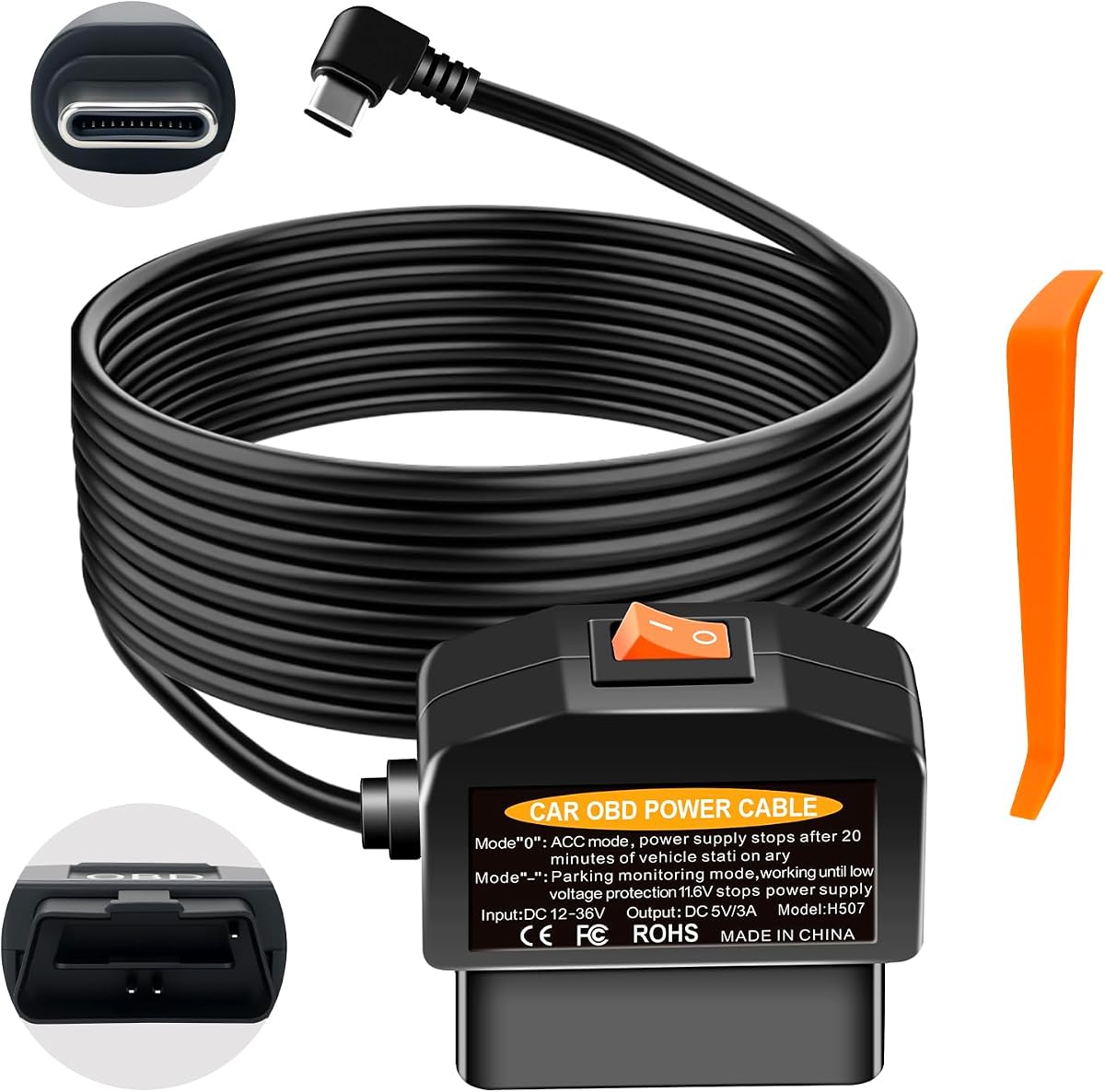
This budget-friendly cable features a right angle USB C connector that saves space in tight areas. It includes a trim tool for hiding wires and offers basic low voltage protection.
We may earn a commission when you buy through this link, at no additional cost to you.
The right angle design prevents the cable from sticking out and helps in clean cable management. It provides 5V/3A output suitable for most USB-C dash cams.
The manual warns that prolonged parking mode may still drain the battery if cutoff is ignored. It is strictly for power not diagnostics.
This cable is great for budget buyers who want easy install. Just use parking mode responsibly to avoid battery issues.
Right angle connector fits neatly near dash cam ports in tight spaces.
Low cost option that still includes a trim tool for hidden setup.
We may earn a commission when you buy through this link, at no additional cost to you.
This hardwire kit includes a 6-in-1 circuit protection system that covers overheat and reverse polarity. It has a selector switch for ACC and 24/7 parking modes.
We may earn a commission when you buy through this link, at no additional cost to you.
The dual mode selector lets you choose between daily and parking use easily. It cuts power at 11.6V or 23.4V depending on the vehicle system.
The 6-in-1 protection adds safety layers but adds complexity. It also requires your dash cam to use A5-B5 pin definitions.
This kit fits users who want maximum safety features. It is a good choice for varied vehicle electrical systems.
Six protections shield your dash cam and vehicle from electrical surges.
Taps only power to isolate ECU data and prevent interference.
We may earn a commission when you buy through this link, at no additional cost to you.
This kit uses a one-button switch to toggle between ACC and surveillance modes. It has strong compatibility with many fuel vehicles and includes voltage cutoff.
We may earn a commission when you buy through this link, at no additional cost to you.
The simple one-button switch makes mode changes easy for all users. It supports 12V to 24V systems and works with most Type-C dash cams.
It is only for fuel vehicles not hybrids or electric models. You must confirm your dash cam uses A5-B5 pins.
Buy this if you prefer simple switch control. It suits most cars where you want quick mode changes.
One button operation changes modes instantly without complicated steps.
Designed for fuel vehicles not hybrids to match ignition behavior.
We may earn a commission when you buy through this link, at no additional cost to you.
This hardwire kit includes an A5-to-A8 adapter that helps with specific dash cam models. It features fireproof materials and auto cutoff at 11.6V for safety.
We may earn a commission when you buy through this link, at no additional cost to you.
The included A8B8 adapter resolves compatibility issues for certain cams. Fireproof materials add safety against heat and short circuits.
Verify your OBD port provides constant power when off. It does not work with electric vehicles before 2005.
This kit is useful for dash cams needing A8B8 pins. It adds safety with fireproof design for peace of mind.
A5-to-A8 adapter helps resolve compatibility issues for select dash cams.
High-temp materials reduce risks of melting or fire under hood heat.
We may earn a commission when you buy through this link, at no additional cost to you.
This premium kit offers four adjustable voltage cutoffs to match battery needs. It includes an LED screen and a 90-degree angled connector for better fit.
We may earn a commission when you buy through this link, at no additional cost to you.
The four cutoff levels let you set 11.6V to 20-minute timers for flexibility. A 90-degree connector saves space and organizes cables neatly.
Timer mode may fail if vehicle moves or stops. Always verify your dash cam uses A5-B5 pins.
Buy this for flexible protection and clean fits. It suits users who want control over voltage cutoffs.
Four levels let you tailor voltage protection to your driving habits.
Angled connector saves space and fits neatly near side-mounted ports.
We may earn a commission when you buy through this link, at no additional cost to you.
This cable supports up to 36V input which makes it fit more commercial vehicles. It has a mode switch and low voltage cutoff to protect your battery.
We may earn a commission when you buy through this link, at no additional cost to you.
The 36V input range supports trucks and large rigs not just cars. A mode switch toggles daily and parking use easily.
It may need you to move the car to activate power. Ensure your dash cam uses A5-B5 pins.
This is a strong pick for trucks and varied voltages. It offers wide compatibility and safe cutoff for big rigs.
Handles up to 36V so it fits commercial trucks and large vehicles.
Switch and cutoff protect battery during parking and daily use.
We may earn a commission when you buy through this link, at no additional cost to you.
Choosing the right adapter involves checking your dash cam's pin definition and your vehicle's OBD behavior to ensure parking mode works reliably.
Most dash cams use A5-B5 pins but some use A8-B8 which may need an adapter. Check your dash cam manual or seller info to confirm pin compatibility before buying.
Verify pin definition to avoid needing extra adapters or having an incompatible cable.
Look for adapters with adjustable cutoffs like 11.6V or 12.5V to match your battery health. This prevents deep discharge and ensures your car can start after parking.
Choose an adapter with adjustable cutoff to protect your battery and avoid starting issues.
A physical switch lets you choose between daily use and 24/7 parking modes easily. This simplifies setup and avoids confusing app controls or software changes.
A mode switch gives you quick control over power without complex steps.
A cable longer than 3 meters helps hide wires cleanly behind trim and panels. Shorter cables may force messy routing that reduces safety and neatness.
Pick a cable long enough to run wires hidden without tension or strain.
An LED display shows real time battery voltage so you know when your car is draining power. This helps avoid dead batteries during long parking periods.
An LED voltmeter lets you monitor battery health at a glance.
Look for multiple protections like overcurrent short circuit and overheat safeguards to protect both your dash cam and car electronics. These reduce risks from surges or faults.
Multiple circuit protections reduce risks to your dash cam and vehicle.
Some cars cut OBD power when off and may need a drive to activate. Always check your owner manual or test the port with a multimeter before installing.
Check OBD port behavior to confirm parking mode will work as expected.
Adapters that include trim tools help hide wires and avoid damage to panels. This makes installation cleaner and safer without needing extra purchases.
Included tools simplify hidden installation and reduce risk of damage.
Plug the adapter into your vehicle's OBD-II port usually found near the steering column and connect your dash cam to the USB-C end. Tuck the cable behind panels and trim using included tools to keep it hidden and secure.
Switch to the correct mode depending on your needs using the physical switch. Use ACC mode for daily driving or parking mode for continuous 24/7 recording. Monitor battery voltage if your adapter has an LED screen.
If the adapter does not power your dash cam after shutting off drive the car briefly to 20 kilometers per hour. Check that the port provides constant power when off by testing with a multimeter.
Most dash cams use A5-B5 pins but some use A8-B8 which may not fit. Check your dash cam manual or ask the seller for pin definition before buying. If needed choose an adapter that includes an A8-B8 adapter cable.
The adapter monitors battery voltage and cuts power when it drops below a set level like 11.6V. This prevents your car battery from draining deeply and ensures the vehicle can start after parking periods.
Some vehicles cut OBD power when off which may disable parking mode. Try driving the car briefly to activate the port. Check your vehicle manual to see if the OBD port stays powered when the engine is off.
Most adapters are designed for fuel vehicles where the ignition signal works through the OBD port. Some electric or hybrid vehicles may need special adapters. Verify compatibility with your vehicle model before purchasing.
The duration depends on your battery health and power consumption of the dash cam. Use low voltage protection to avoid draining the battery completely. Long-term parking may still reduce charge so monitor voltage if possible.
Most adapters include multiple protections like overcurrent and short circuit safeguards to prevent damage. They only draw power and do not access data lines. Still use a certified adapter to ensure electrical safety.
Use a multimeter to test the port voltage with the engine off. Check your owner manual or forums for your vehicle model. Some cars shut off power after a short delay which may affect parking mode.
No these adapters plug directly into the OBD port and do not require fuse tapping. This makes installation simpler and cleaner. You can route wires through trim without opening fuse boxes.
The top three picks offer different strengths like LED displays adjustable cutoffs and budget friendly options. Choose based on your dash cam pin type and whether you need visual battery monitoring.
Prioritize low voltage protection and clear mode controls to avoid battery drain. Check your vehicle OBD behavior to ensure parking mode works reliably without extra steps.
Verify current availability and compatibility before buying to avoid returns. Keep an eye on model updates that may add features or improve support for newer dash cams.