
Akai Professional LPD8 USB MIDI Pad Controller
4.4Editor score
8 RGB-backlit MPC drum pads
8 assignable Q-Link knobs
Plug and play operation
This guide compares the top ten MIDI controllers for drum programming. drumming, and music production to help you find the best tool for your creative setup.
Finding the right MIDI controller for drums can transform your music production workflow significantly. Whether you are creating beats or performing live, the right pad controller offers tactile feedback and precise control over your virtual instruments and samples.
We have evaluated ten standout models based on their build quality, responsiveness, software integration, and overall versatility. This list covers a wide range of options from budget-friendly pad controllers to comprehensive keyboard hybrids with drum capabilities.
Each pick includes detailed specifications and key features to help you make an informed decision for your studio or mobile setup. Keep in mind that product availability and pricing may change over time so check current listings before purchasing.
4.4Editor score

4.4Editor score

4.5Editor score
This comparison table outlines the core specifications and features of each controller to help you quickly identify the model that best fits your specific production needs and workflow preferences.




The Akai Professional MPD218 stands out as a top choice for producers seeking a reliable pad controller focused on drum workflows. It delivers a high rating among users for its sturdy construction and responsive pads that feel like the real deal.
We may earn a commission when you buy through this link, at no additional cost to you.
Its standout qualities include 16 thick MPC pads arranged across three banks for a total of 48 assignable zones. The controller also features 18 fully assignable potentiometers that give you hands on control over DAW parameters and effect chains.
While the build is impressive some users note that driver installation is required on Mac systems for full functionality. Additionally the lack of per pad visual feedback can make bank switching less intuitive during live performance without visual reference.
This controller is best suited for beat makers and electronic musicians who prioritize tactile feel and deep integration with their production software. If you want a durable pad controller that feels premium under your fingers the MPD218 is a strong recommendation.
The pads are designed to mimic the feel of hardware MPCs allowing for expressive finger drumming with precise velocity sensitivity.
With 18 knobs and three banks of pads you can map nearly every parameter in your virtual instruments or mixing environment.
We may earn a commission when you buy through this link, at no additional cost to you.
The Akai Professional LPD8 is an ideal entry point for musicians who want a compact MIDI controller without breaking the bank. It holds a solid rating and is praised for its portability and ease of use in laptop bags.
We may earn a commission when you buy through this link, at no additional cost to you.
Its key strengths include eight RGB backlit pads and eight Q-Link knobs that map seamlessly to your DAW for mixing and tweaking. The slim design means it takes up minimal desk space while still offering essential production controls for sampling and effects.
Compared to higher end models the LPD8 offers fewer pads and less granular control over parameters due to its simpler knob design. These trade-offs are acceptable given the low cost and the fact that it works immediately without software installation.
If you are looking for a portable and affordable option to trigger samples and control effects on the go the LPD8 is a great fit. It is perfect for beginners and traveling producers who need reliable beat maker tools in a small package.
Its lightweight build and slim profile allow you to stash it in any laptop bag for beat production anywhere you go.
Plug and play functionality means you can start making beats instantly on any Mac or PC without driver headaches.
We may earn a commission when you buy through this link, at no additional cost to you.
The Akai Professional MPK Mini Plus offers a premium hybrid experience by combining a full size keyboard with professional grade drum pads. It earns a high rating for those who need melodic control alongside powerful beat making capabilities in one unit.
We may earn a commission when you buy through this link, at no additional cost to you.
Its standout features include a 37-key keybed and eight responsive RGB pads plus a built in 64-step sequencer for standalone composition. The unit also supports CV and MIDI I/O making it a versatile hub for connecting modular gear and external sound sources.
While it provides extensive functionality the added features result in a heavier and larger footprint compared to the standard mini controllers. The higher price point is justified by the expanded range and connectivity options that support more complex production setups.
This controller is best for serious producers who want a comprehensive solution for composition and performance. If you need a robust keyboard with drum pads and standalone sequencing the MPK Mini Plus delivers a complete studio experience in one package.
The built-in 64-step sequencer lets you compose drum and melody patterns without needing to open your laptop software.
CV and MIDI I/O options allow you to interface with synthesizers and modular gear for expanded sound design possibilities.
We may earn a commission when you buy through this link, at no additional cost to you.
The Akai Professional APC Mini MK2 is designed specifically for live performance and studio control within the Ableton Live ecosystem. It holds a high rating for its seamless integration that allows users to launch clips and mix tracks with hands on precision.
We may earn a commission when you buy through this link, at no additional cost to you.
Its key strengths include 64 RGB pads for launching clips and nine assignable faders for mixer control. The Smart Scale View feature helps you play melodies easily by limiting notes to a chosen scale which is great for beginners.
While the pads offer visual feedback they do not support velocity sensitivity which limits their use for traditional drumming applications. The control surface is also optimized primarily for Ableton Live so users of other DAWs may find mapping less intuitive.
This controller is ideal for electronic artists and live performers who work primarily in Ableton Live. If you need a controller that lets you trigger loops and mix tracks visually the APC Mini MK2 is the perfect companion for your workflow.
The 64 RGB pads are pre mapped to launch clips instantly giving you a colorful grid to perform with live.
Nine faders allow you to adjust volume and pan on the fly making it easy to manage a full session.
We may earn a commission when you buy through this link, at no additional cost to you.
The Xjam Mobile Studio is a unique controller that focuses on portability and high resolution touch features like polyphonic aftertouch. It is rated well for its distinctive design that ensures durability while maintaining a sleek profile for mobile production tasks.
We may earn a commission when you buy through this link, at no additional cost to you.
Its standout qualities include adjustable sensitivity and tricolor LED feedback on pads that handle up to 48 assignable zones via memory banks. The aluminum frame protects the internals and provides a premium feel that stands out among plastic alternatives in the market.
The smaller pad surface can make fast finger drumming slightly more challenging compared to full size pad grids. Additionally the higher price point might be a consideration for those looking for a basic pad controller without advanced touch features.
If you value a premium build and need to work on mobile devices like iPhone or iPad this controller is an excellent choice. It is perfect for producers who want tactile depth and visual feedback in a compact aluminum design.
Polyphonic aftertouch lets you change modulation on individual notes while holding them for more dynamic performances.
Designed to work seamlessly with iOS apps this unit supports mobile setups for producers on the move.
We may earn a commission when you buy through this link, at no additional cost to you.
The Akai Professional MPK Mini IV is the latest evolution of the classic compact controller featuring modern connections and a vibrant screen. It holds a strong rating for its next gen build quality and comprehensive software bundle that includes Melodics and Splice.
We may earn a commission when you buy through this link, at no additional cost to you.
Its key strengths include a vibrant full-color screen for navigation and 360-degree knobs that offer smooth control over parameters. The 25 velocity-sensitive keys and eight MPC pads provide a balanced approach for both melodic playing and drum triggering in a small footprint.
The mini keys may take some getting used to for players transitioning from full-size keyboards. Additionally the screen interface might feel complex for beginners who want to simply plug in and start producing without configuration.
This controller is ideal for modern producers who want a portable all-in-one tool for beats and keys. If you need a lightweight device with screen feedback and a modern USB-C port the MPK Mini IV is a top choice for 2026.
The vibrant full-color screen provides instant access to settings and presets without needing to look at your computer.
A full-size MIDI out port allows you to connect to external hardware synths without needing extra adapters.
We may earn a commission when you buy through this link, at no additional cost to you.
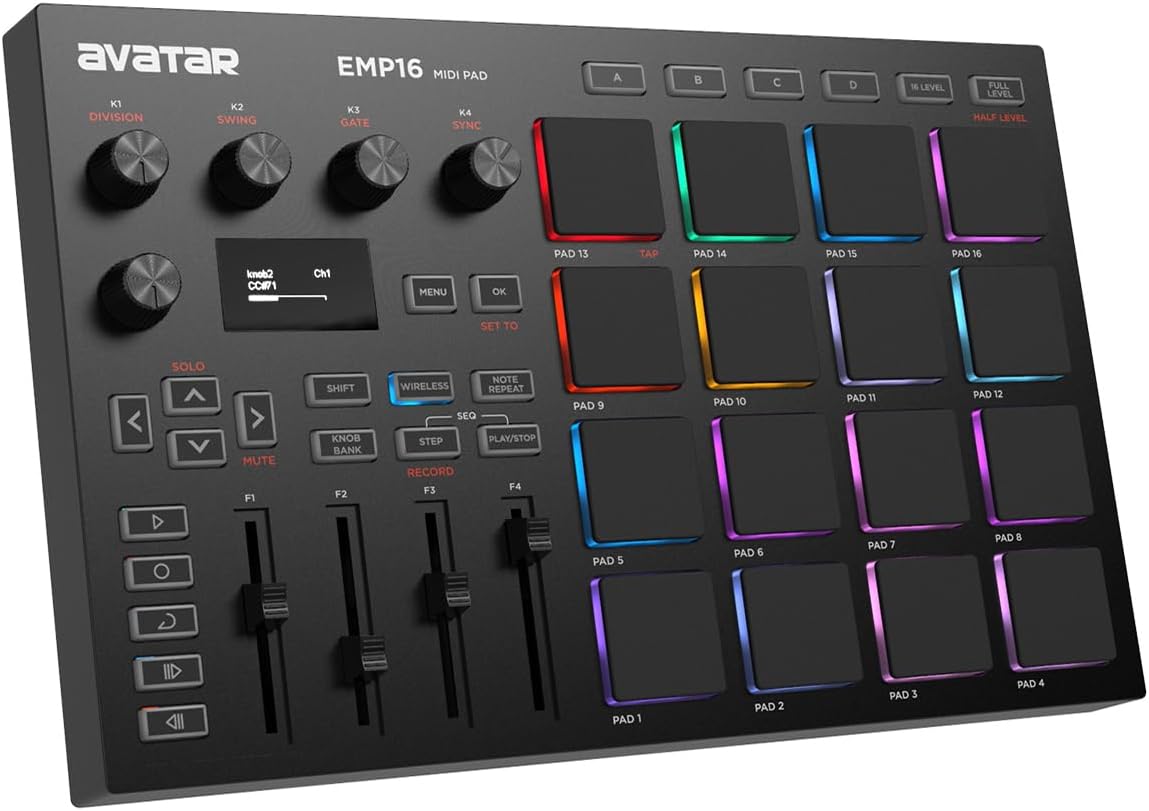
The EMP16 MIDI Pad Controller offers a distinct advantage with Bluetooth 5.0 connectivity allowing for wireless production on mobile devices. It receives a solid rating for its versatile setup that includes battery power and an OLED display for quick adjustments on the fly.
We may earn a commission when you buy through this link, at no additional cost to you.
Its standout qualities include 16 RGB illuminated pads and four banks that expand to 64 assignable zones for deep customization. The OLED display shows settings instantly so you do not need extra editor software to manage mappings during your session.
Wireless connections can sometimes introduce latency which might affect timing during fast drumming sequences. The build quality is functional but not as rugged as metal or heavy plastic controllers found at higher price points.
This controller is best for mobile producers who want freedom from cables when working on iPads or phones. If you need a wireless pad controller that supports battery power and offers visual feedback the EMP16 is a compelling option.
Bluetooth 5.0 allows you to connect to DAWs on mobile devices without needing any wires or adapters.
The OLED display keeps your settings visible so you can change banks and curves without looking at your computer.
We may earn a commission when you buy through this link, at no additional cost to you.
The PreSonus ATOM delivers a unique experience with full-size velocity and pressure sensitive pads that allow for nuanced expression. It has a solid rating among users who appreciate the extra surface area and flexibility compared to smaller grid controllers.
We may earn a commission when you buy through this link, at no additional cost to you.
Its key strengths include 16 pads that feel closer to a standard drum pad and 20 assignable buttons for transport and effect triggering. The included Studio One Artist software adds significant value and helps beginners start producing immediately after unboxing.
The pads are slightly stiffer than some competitors which might require more pressure to trigger. Additionally while the software is generous it is specific to the PreSonus ecosystem which may limit appeal for users of other DAWs.
If you prefer larger pads and want deep pressure sensitivity for expressive performance the ATOM is a strong contender. It is ideal for producers who value tactile feedback and want a complete production package with software included.
The pads are full size making them easier to play quickly without accidentally hitting neighbors during fast runs.
Pressure sensitivity allows for added expression by changing parameters based on how hard you press the pads.
We may earn a commission when you buy through this link, at no additional cost to you.
The Akai Professional MPK Mini MK3 is a proven workhorse that balances keyboard and pad controls in a highly portable form factor. It holds a high rating for its widespread adoption and ease of use across different production environments.
We may earn a commission when you buy through this link, at no additional cost to you.
Its standout qualities include a four-way thumbstick for pitch and modulation control that eliminates the need for extra wheels. The controller also offers NKS support which lets you browse and load Native Instruments presets directly on the device.
The keys have a thin travel which may feel less substantial to pianists compared to semi-weighted models. The knobs are also not endless which means you might need to be careful when mapping parameters to avoid offset values.
This controller is perfect for creators who need a versatile tool for melodic input and drum triggering on the go. If you want a reliable and compact device with solid software support the MPK Mini MK3 is an excellent choice.
The thumbstick provides intuitive pitch bend and modulation control without taking your hands off the keyboard or pads.
NKS integration ensures you can easily manage presets from Native Instruments directly on the controller screen.
We may earn a commission when you buy through this link, at no additional cost to you.
The Korg nanoPAD2 is one of the most compact controllers available making it an easy add-on to any studio or travel bag. It receives a good rating for its simplicity and ultra-slim design that does not take up valuable desktop real estate.
We may earn a commission when you buy through this link, at no additional cost to you.
Its key strengths include 16 velocity-sensitive pads and an X-Y touchpad that allows you to control modulation and effects with a swipe. This unique touchpad is particularly useful for live manipulation of filters or effects without reaching for a mouse.
The pads are smaller than other options which can be challenging for complex finger drumming. Additionally it lacks some advanced features like velocity curve adjustments or dedicated control knobs that are found on slightly larger controllers.
If you need the smallest possible footprint and want basic pad control for entering drum data the nanoPAD2 fits the bill. It is ideal for laptop users who want a compact trigger tool without adding bulk to their setup.
The touchpad lets you change sound parameters dynamically using X and Y axes for expressive live control.
Its slim design fits easily into any laptop case making it the ultimate controller for minimal travel setups.
We may earn a commission when you buy through this link, at no additional cost to you.
Choosing the right controller depends on your workflow needs and the software you use daily.
The number of pads determines how many samples or notes you can trigger at once. Some controllers offer a fixed grid of sixteen pads while others allow bank switching to expand to sixty four or more zones.
Look for a layout that matches your playing style. If you need many sounds without switching banks a controller with more pads is essential.
Velocity sensitivity ensures that harder hits produce louder sounds which is crucial for dynamic drumming. Some advanced models also feature pressure sensitivity to control modulation or volume while holding a note.
Prioritize controllers with adjustable curves so you can tailor the touch to your finger strength and preference.
Many manufacturers offer controllers pre-mapped to specific software like Ableton Live or Studio One. This reduces setup time and lets you focus on production immediately after connecting the device.
Check if the device comes with a software bundle that meets your needs such as Lite versions of DAWs or sample libraries.
USB is the standard connection but some models include MIDI IN and OUT ports for external gear. Wireless options like Bluetooth can also add freedom for mobile production scenarios.
Ensure the connection type supports your device whether that is a laptop desktop or tablet for seamless operation.
Aluminum frames and sturdy plastics ensure durability during travel. For mobile producers weight and size matter significantly when packing a bag.
Choose a build that can withstand daily use and fits comfortably in your storage space.
Knobs faders and buttons allow you to tweak effects and parameters without touching the computer. More assignable controls offer deeper integration with your software.
Consider how many physical controls you need for mixing or adjusting synth parameters during a session.
Controllers range from affordable entry-level options to high-end models with advanced features. Determine which features are essential versus nice-to-have to stay within your budget.
Often mid-range models provide the best balance of features and cost for most producers.
RGB pads and OLED screens provide visual cues for active notes and settings. This feedback is helpful for live performance and quick adjustments.
Look for models with bright LEDs or screens if you often perform in low-light environments.
Start by connecting your controller to your computer via USB and installing any required drivers. Open your DAW and select the MIDI device in the preferences menu to ensure signals are being received.
Use the included software to map knobs and faders to the parameters you use most often. This customization ensures that your hardware feels like an extension of your virtual instruments.
Keep the unit clean by wiping it with a dry cloth and storing it in a bag when not in use. Avoid exposing the device to extreme humidity or temperature changes to maintain longevity.
MIDI pads are typically used to trigger drums samples and short loops with finger drumming techniques. Keys are better suited for playing melodic instruments like pianos and synths where pitch and polyphony are important.
Most controllers work as plug-and-play devices with any DAW. However some models come bundled with specific software to enhance the experience and reduce initial setup time.
Yes velocity-sensitive pads allow for dynamic expression based on how hard you hit the pad. This is essential for realistic drumming and expressive performance in most music genres.
Many models support iOS either directly or with a connection kit. Check the product specifications for iOS compatibility and ensure your DAW on iPad supports MIDI input.
Assignable controls like knobs and faders let you map parameters such as volume or filter cutoff to hardware. This allows you to tweak your sounds without looking at your computer screen.
Visit the manufacturer's website and download the latest firmware tool for your specific model. Connect the controller via USB and follow the instructions to update the internal software.
Yes most controllers are compatible with both Windows and Mac operating systems. Ensure you download the correct drivers for your OS version if required by the manufacturer.
The Akai Professional MPD218 LPD8 and MPK Mini Plus stand out as top choices for their specific use cases. Each offers a unique balance of features to suit different production needs and budget constraints.
When choosing prioritize tactile feel and the number of pads you need for your workflow. If you perform live consider a model with visual feedback and robust connectivity.
Always check current listings for availability and verify compatibility with your software. The right controller can significantly boost your productivity and creativity in the studio.