
RedThunder One Handed Gaming Keyboard RGB Backlit 35 Keys Portable Mini Gaming Keypad
4.4Editor score
35 key anti-ghosting
Macro recording capability
RGB backlight options
This guide compares the top left handed gaming keyboards for comfort and performance, helping you find the best ergonomic setup for your gaming needs today.
Finding the right left handed gaming keyboard can transform your gaming experience significantly. These specialized devices offer unique layouts designed to reduce strain and improve control for users who prefer their dominant hand on the mouse while typing with the other.
We evaluated ten top-rated models based on build quality, ergonomic design, connectivity options, and customization features. Our analysis focuses on how each product balances performance with comfort for extended gaming sessions and daily productivity tasks alike.
Each pick highlights key strengths and potential limitations to help you make an informed decision. Keep in mind that prices and availability may change over time, so checking current listings ensures you get the best value for your specific requirements.
4.4Editor score

4.6Editor score

4.6Editor score
The following table provides a quick side-by-side overview of all ten models. Compare key specifications like switch types, connectivity, and special features to identify which device aligns best with your gaming style and budget constraints.


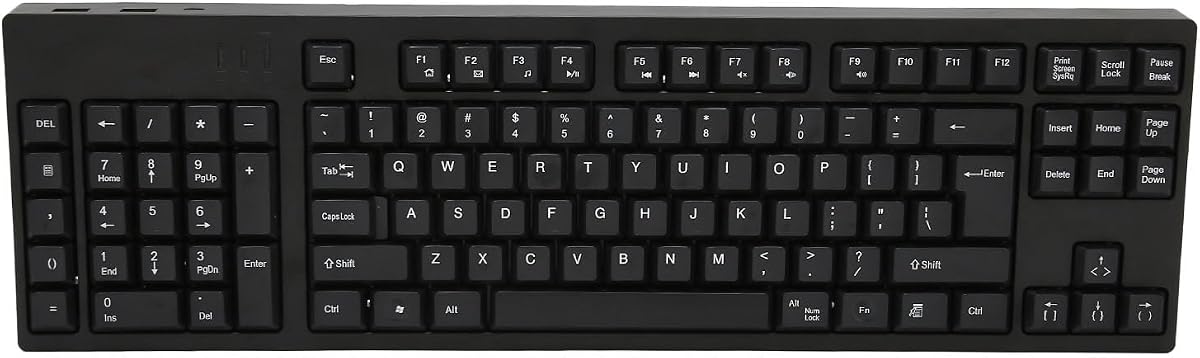

The RK ROYAL KLUDGE L98 stands out as the top choice for left-handed gamers seeking a full keyboard experience. Its Southpaw layout relocates the numpad to the left, freeing up space on the right for mouse movement while maintaining full functionality for productivity tasks.
We may earn a commission when you buy through this link, at no additional cost to you.
Built with a gasket-mounted structure and five layers of sound dampening, this keyboard delivers a premium typing feel with reduced vibrations. The tri-mode connectivity supports seamless switching between wireless and wired modes, and the massive 8000mAh battery ensures weeks of use without recharge.
While it is pricier than mini keypads, the trade-off is a complete typing solution rather than just a gaming overlay. The hot-swappable design allows for future customization, making it a versatile long-term investment for both gaming and office work.
This model is ideal for left-handed users who want ergonomic benefits without sacrificing standard keyboard capabilities. Its combination of comfort, durability, and connectivity options makes it the most balanced pick in our entire lineup.
The Southpaw design specifically addresses comfort by aligning the numpad with the left hand, reducing strain during data entry or gaming.
Gasket mounting and PBT keycaps provide a soft yet durable typing experience that resists wear over extended daily use.
We may earn a commission when you buy through this link, at no additional cost to you.
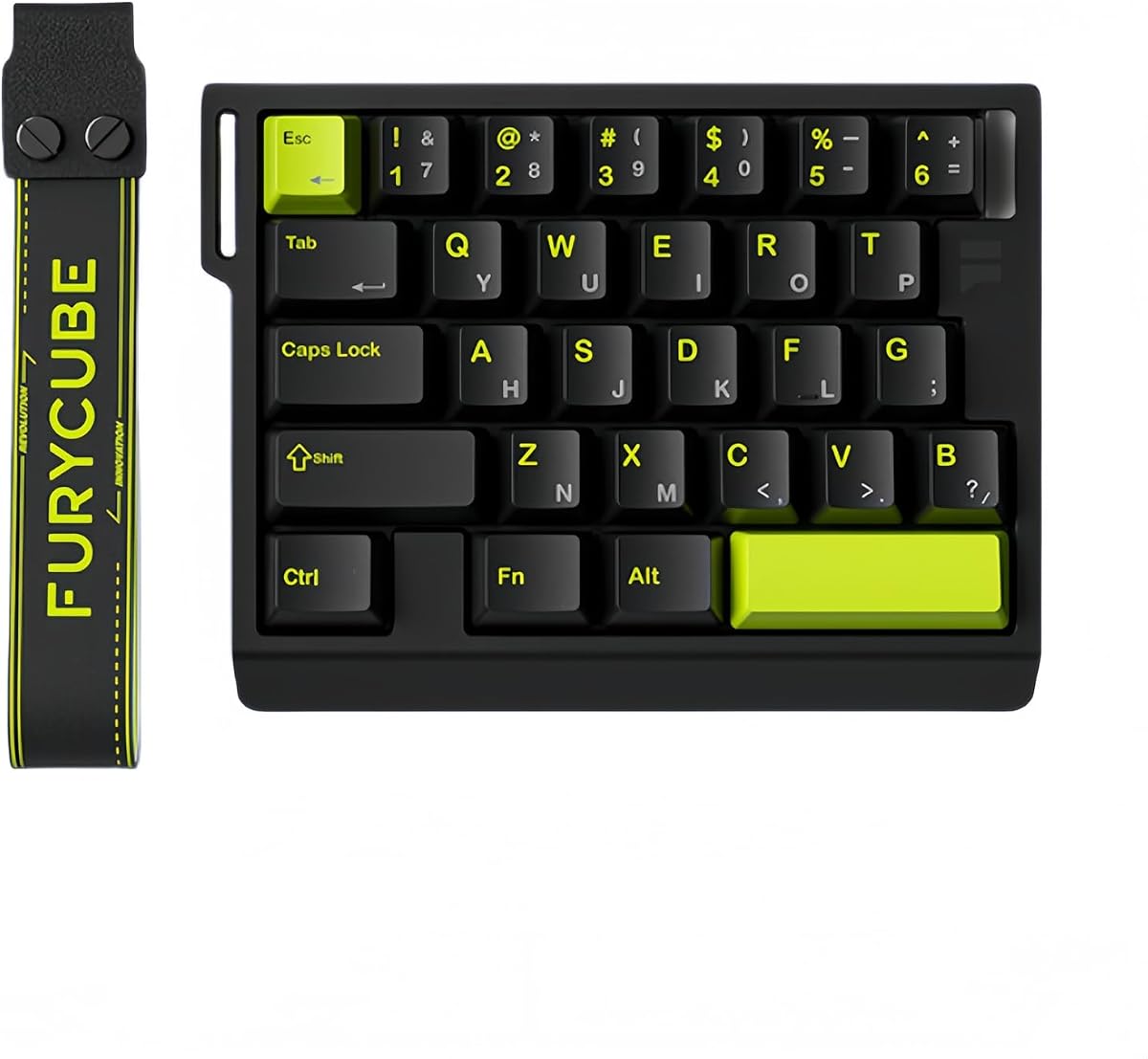
The RedThunder One Handed Gaming Keyboard offers an accessible entry point for those wanting a dedicated gaming keypad. At a fraction of the cost of premium models, it provides essential features like anti-ghosting and macro recording that enhance gameplay without breaking the bank.
We may earn a commission when you buy through this link, at no additional cost to you.
Its compact 35-key layout saves significant desk space, leaving room for large mouse movements. The ergonomic wrist rest helps reduce fatigue during longer sessions, and the RGB backlight adds a stylish touch that many gamers appreciate for their setup aesthetics.
While it lacks the advanced features of higher-end options, it performs reliably for casual and competitive play. The driver-free plug-and-play setup means you can start using it immediately without complex configuration or software installation.
For budget-conscious gamers or those needing a secondary portable device, this keypad delivers excellent value. It balances essential functionality with an ergonomic form factor, making it the best affordable choice available today.
The small form factor makes it easy to carry between locations or store when not in use for flexible workspace setups.
Built-in macro recording allows you to automate complex commands for quicker execution during intense gaming moments.
We may earn a commission when you buy through this link, at no additional cost to you.
The AZERON Keyzen represents the pinnacle of one-handed gaming input devices. With Cherry MX mechanical switches and a precision Hall Effect joystick, it offers unparalleled control for movement and actions in games where every millisecond counts.
We may earn a commission when you buy through this link, at no additional cost to you.
Its adjustable ergonomic design fits various hand sizes, allowing users to customize finger angles and palm rests for maximum comfort. The modular construction means individual components can be replaced or upgraded, extending the device lifespan significantly compared to standard options.
While the cost is substantial, the performance benefits justify the investment for serious competitive players. The ability to map inputs to keyboard, mouse, or controller actions provides unmatched flexibility for complex gameplay scenarios.
This device is best suited for professionals or enthusiasts willing to invest in top-tier peripherals. Its combination of build quality, customization, and precision makes it the highest performing option in our comprehensive review.
The Hall Effect joystick eliminates drift and supports true analog movement for smoother gameplay in compatible titles.
Cherry MX switches provide consistent tactile feedback and durability that outlasts membrane alternatives significantly.
We may earn a commission when you buy through this link, at no additional cost to you.
The AZERON Gaming Keypad Cyborg II focuses on advanced adjustability and analog control. Its Hall Effect thumbstick eliminates stick drift, providing smooth and precise movement that traditional digital keys cannot match for specific gaming scenarios.
We may earn a commission when you buy through this link, at no additional cost to you.
Users can customize dead zones and sensitivity, tailoring the experience to their exact preferences. The exclusive software allows for extensive customization, including diagonal keybinds and analog smoothing to enhance gameplay fluidity during competitive matches.
The keypad stores up to six layouts directly, making it easy to switch between game types instantly. However, full functionality requires software, which may be a barrier for some users preferring plug-and-play simplicity without configuration.
This model suits players who prioritize analog precision and customization over key count. Its modular design ensures longevity through future updates, making it a strong contender for those willing to dive into detailed settings.
The thumbstick functions as a mouse alternative, offering versatile control for aiming or navigation without a second hand.
Modular enhancements and updateable firmware ensure the device remains relevant as gaming demands evolve.
We may earn a commission when you buy through this link, at no additional cost to you.
The AJAZZ AK029 is engineered specifically for competitive FPS gaming with its Rapid Trigger and magnetic switch technology. This allows for lightning-fast resets and seamless counter-strafing, giving players a tangible edge in high-stakes matches.
We may earn a commission when you buy through this link, at no additional cost to you.
Its 8KHz polling rate ensures near-zero latency, translating every input instantly to the screen. The compact 29-key layout maximizes desk space for large mouse movements while maintaining essential keys for complex gaming maneuvers and shortcuts.
A rugged aluminum build and five-layer acoustic structure provide a premium feel and dampened sound. While it lacks wireless capability, the focus on wired performance ensures stability and speed that wireless connections sometimes struggle to match consistently.
This keyboard is best for FPS enthusiasts demanding maximum responsiveness. Its specialized features and durable construction make it a standout choice for anyone prioritizing speed over versatility in their gaming setup.
Instant key resets allow for fluid movement techniques and quick reactions during intense combat scenarios.
The 8KHz polling rate minimizes input delay for smooth and accurate command execution in real-time gameplay.
We may earn a commission when you buy through this link, at no additional cost to you.
The Ergonomic Left Handed Keyboard is designed primarily for business and accounting professionals seeking to reduce physical strain. Its patented key structure promotes natural posture, helping to alleviate back and shoulder tension common during long hours at a computer.
We may earn a commission when you buy through this link, at no additional cost to you.
Multimedia hotkeys add convenience for daily tasks like volume control and media playback. Compatible with both Windows and Mac systems, it offers flexibility for mixed office environments without requiring specific software or drivers.
While it lacks gaming-specific features like RGB lighting, its focus on comfort and health makes it valuable for productivity. The layout supports left-handed numeric entry, keeping the right hand free for mouse work during data entry tasks.
This keyboard suits professionals prioritizing health and efficiency over gaming performance. It is an ideal choice for left-handed office workers looking to improve posture and reduce repetitive strain through ergonomic design.
The patented design aligns keys to reduce finger and wrist strain during prolonged typing sessions.
Multimedia hotkeys streamline daily workflows without needing to reach for separate control devices.
We may earn a commission when you buy through this link, at no additional cost to you.
The Keychron C0 HE features a web-based configurator that eliminates the need for local software installation. This makes setup straightforward across Windows and Mac systems, appealing to users who prefer browser-based tools over downloadable applications.
We may earn a commission when you buy through this link, at no additional cost to you.
Powered by Hall Effect magnetic switches, it delivers rapid trigger capabilities for low latency performance. The 35-key layout keeps essential commands within easy reach, ideal for MMO or MOBA players who rely on quick skill access.
RGB lighting adds visual appeal, while the magnetic switches allow for precise actuation customization. Though it requires an internet connection for initial configuration, the convenience of cloud-based settings outweighs this minor limitation for many users.
This keypad is perfect for creators and gamers wanting flexible controls without complex software. Its balanced feature set and ease of use make it a reliable option for multi-system setups and streamlined workflows.
Web-based customization allows instant changes without installing extra software on your operating system.
The 35-key design retains essential commands for both gaming and productivity tasks efficiently.
We may earn a commission when you buy through this link, at no additional cost to you.
This left-handed keyboard offers a full 109-key layout with a relocated numpad for efficient left-hand data entry. Its ergonomic design relieves right-hand fatigue by allowing the right hand to focus entirely on mouse operations during work sessions.
We may earn a commission when you buy through this link, at no additional cost to you.
The Micro USB connection includes two additional USB interfaces for connecting peripherals, reducing hub clutter on your desk. Constructed from premium ABS material, it provides a sturdy and stable typing surface for daily business use.
Plug-and-play functionality means no installation is required. Simply connect the cable and start typing immediately. While the Micro USB port is less modern than Type-C, it remains widely compatible with most computer systems.
This model is ideal for accountants or designers needing a full keyboard layout with ergonomic benefits. It balances functionality with durability, making it a practical choice for left-handed professionals working long hours.
Retains all standard keys while shifting the numpad to optimize desk space and workflow efficiency.
Integrated USB ports allow direct connection of devices like drives or mice without extra adapters.
We may earn a commission when you buy through this link, at no additional cost to you.
The FKZ M30HE combines magnetic switches with hot-swappable technology for high customization. Users can adjust actuation points between 0.1mm and 3.4mm, tailoring the keyboard to their specific preferences for speed or sensitivity in games.
We may earn a commission when you buy through this link, at no additional cost to you.
With an 8KHz polling rate, it delivers competitive performance suitable for e-sports. The 30-key layout retains essential gaming keys, ensuring quick access to commands without unnecessary clutter on the desk during intense sessions.
RGB lighting and a web driver allow for extensive customization without local software. However, the setup process may require patience to optimize settings effectively. The hot-swap feature adds versatility for users wanting to experiment with different switch types.
This keyboard suits tech-savvy gamers wanting granular control over inputs. It offers advanced features typically found in higher-end models, making it a compelling option for those willing to invest time in configuration.
Easily change switches without soldering to experiment with different tactile profiles and feel.
Adjustable travel distances let you fine-tune sensitivity for specific game mechanics accurately.
We may earn a commission when you buy through this link, at no additional cost to you.
The A4tech Ergonomic Left Handed Keyboard focuses on health benefits for business users. Its patented layout reduces strain on wrists and shoulders, aiming to eliminate repetitive strain injuries like carpal tunnel through improved posture alignment.
We may earn a commission when you buy through this link, at no additional cost to you.
Eight multimedia hotkeys provide quick access to essential functions like volume and play controls. It is designed specifically for accounting and business tasks, ensuring productivity remains high while physical comfort is maintained during long workdays.
Though it lacks modern gaming features, its health-focused design makes it valuable for anyone experiencing hand or wrist pain. The layout supports right-handed mouse use while keeping the left hand active for data entry tasks comfortably.
This model is recommended for left-handed professionals prioritizing long-term health over gaming performance. It offers an affordable solution for ergonomic needs in office environments without compromising standard keyboard functions.
Patented structure helps prevent strain and injury during extended typing and computer usage.
Multimedia keys streamline daily tasks, reducing the need to reach for separate devices.
We may earn a commission when you buy through this link, at no additional cost to you.
Choosing the right left-handed keyboard requires balancing ergonomics with your specific gaming or work needs. This guide outlines the critical factors to consider before making a purchase.
The layout determines how comfortably you can use the device for hours. Look for models that either relocate the numpad to the left or offer compact designs that free up mouse space. Proper ergonomic alignment reduces strain on wrists and shoulders during extended sessions.
Prioritize keyboards with adjustable palm rests or angled bases that match your hand position naturally.
Mechanical switches offer durability and tactile feedback, while magnetic switches provide rapid trigger capabilities for faster gameplay. Consider whether you prefer tactile clicks or linear smoothness based on your gaming style.
Select switches that match your sensitivity preferences to avoid fatigue or missed inputs during critical moments.
Wired connections ensure zero latency but limit desk space, whereas wireless options offer flexibility at the cost of battery management. Choose based on whether you prioritize stability or mobility for your gaming setup.
Ensure the connection type aligns with your system ports and wireless interference environment.
Advanced features like macro recording, RGB lighting, and key remapping enhance usability. Look for web-based or lightweight software that allows deep customization without cluttering your system.
Software should be intuitive and cross-platform compatible if you use multiple operating systems regularly.
Materials like aluminum alloys and PBT keycaps extend the lifespan of the device. Gasket-mounted structures reduce vibration and improve typing comfort over time.
Invest in devices with replaceable components to maintain long-term performance without full replacements.
For competitive gaming, high polling rates like 8KHz ensure immediate input response. Low latency is crucial for fast-paced games where split-second reactions determine success.
Check technical specifications to confirm latency is minimized for your preferred game genres.
Decide between full-size models for productivity and compact keypads for pure gaming. A balance ensures you have essential keys without unnecessary bulk on the desk.
Choose layouts that retain critical navigation and function keys for your daily tasks.
Set a budget that reflects your investment level. Entry-level models offer basic features, while premium options provide advanced customization and build quality.
Evaluate if the extra features justify the price increase based on your usage frequency and intensity.
To set up your keyboard, connect it via the appropriate cable or USB receiver. Install any required drivers or configure settings through the provided software interface for optimal performance.
Maintain the device by regularly cleaning dust from keys using compressed air. Avoid spills and extreme temperatures to prolong the lifespan of internal components.
Adjust palm rests and angles periodically to prevent repetitive strain. Rotate keycaps if possible to ensure even wear and consistent tactile feel over time.
The AJAZZ AK029 offers Rapid Trigger and 8KHz polling rates ideal for FPS. It allows instant key resets and smooth strafing. This ensures minimal latency during fast-paced gameplay. Its compact design maximizes mouse movement space.
Yes, models like the RK L98 work well for right-handed users too. They provide ergonomic comfort even if the layout is optimized for left hands. Right-handed users can utilize the numpad on the left side comfortably.
Magnetic switches offer faster actuation and rapid trigger features. Mechanical switches provide traditional tactile feedback and durability. Your choice depends on whether you prioritize speed or classic typing feel.
Use the included software to record key sequences. Assign them to specific keys or hotkeys for quick access. This streamlines complex commands and saves time during gameplay or work.
Most models support per-key RGB customization via software. You can create profiles for different games or applications. Some offer browser-based control for easy adjustments without installation.
Wired models ensure zero latency and consistent power. Wireless models offer flexibility but require battery charging. Choose based on your tolerance for cables and need for mobility.
Yes, ergonomic left-handed models reduce strain during data entry. They free up the right hand for mouse use efficiently. This setup improves posture and reduces fatigue over long periods.
Mechanical switches typically last for millions of keystrokes. Replace them if you notice inconsistent feedback or failure. Hot-swappable designs make replacement quick and easy without soldering.
The RK ROYAL KLUDGE L98, RedThunder One Handed Keyboard, and AZERON Keyzen stand out as top picks. They balance performance, comfort, and value for different user needs effectively.
Prioritize ergonomics and latency features if you play competitive titles. For productivity, focus on full-key layouts and comfort improvements. Your specific usage patterns should guide your final decision.
Always verify current prices and availability before purchasing. These recommendations are based on expert analysis but market conditions vary. Staying updated ensures you secure the best value for your specific setup today.