
Brother P-Touch PT-N10
4.3Editor score
Compact portable design
Built-in cutter
12-character display
Finding the right handheld label maker can transform how you organize your home, office, or workspace. A good device offers portability, clear printing, and intuitive controls to help you identify items quickly and efficiently without hassle or confusion during daily tasks.
We evaluated ten top-rated models based on their build quality, printing capabilities, and user-friendly features. Our comparison focuses on battery life, tape compatibility, display clarity, and overall value to ensure you find a device that meets your specific organizational requirements effectively.
Each pick highlights key strengths and potential limitations to guide your decision-making process. While prices may fluctuate over time, these models represent reliable choices for various labeling scenarios ranging from personal storage to professional workspace organization and management.
4.3Editor score

4.7Editor score

4.4Editor score
As an Amazon Associate we earn from qualifying purchases.
This side-by-side comparison details the specifications and unique features of each model to help you identify the best fit for your organizational needs and budget constraints.






The Brother P-Touch PT-N10 stands out as an accessible entry point for personal labeling needs. With a rating reflecting its solid build quality, this device delivers reliable performance for dorm rooms or student life organization tasks.
We may earn a commission when you buy through this link, at no additional cost to you.
Its full QWERTY keyboard makes typing quick and efficient while the built-in cutter ensures clean edges. The device supports creative expression through Btag tapes available in 17 colorful options with split easy peel backings.
While the tape width is limited to half an inch, this compact solution is ideal for identifying belongings or creating reminders. The 12-character display helps avoid mistakes by previewing text before printing.
This model is perfect for individuals needing a simple tool for personal projects. Users prioritizing affordability and portability will find it meets their organizational goals without unnecessary complexity or expense.
Access over 200 symbols and 10 frames to personalize labels uniquely for your specific needs.
Save up to 10 labels in memory for quick reprinting of frequently used or favorite labels.
We may earn a commission when you buy through this link, at no additional cost to you.
The DYMO LetraTag 100H Plus is a robust choice for general home and office organization tasks. Its high rating indicates consistent performance and user satisfaction over time making it a trusted option for many.
We may earn a commission when you buy through this link, at no additional cost to you.
Choose from various font sizes and box styles to create labels that suit different environments. The graphical display lets you preview text effects before printing to ensure accuracy and clarity in your output.
Power efficiency is maintained through auto-off functionality which conserves battery life during periods of inactivity. While it is an older model it remains effective for basic labeling tasks without advanced connectivity.
This device works well for users who prefer simple operation over complex features. If you need reliable labels for storage bins or files this model provides dependable results at a reasonable investment level.
Select from 7 print styles and 8 box styles to match labels to any container or surface.
The package includes paper and plastic labels along with a magnetic holder for convenient storage.
We may earn a commission when you buy through this link, at no additional cost to you.
The DYMO LabelManager 160 offers a comprehensive solution for those needing more advanced features. Its bundle package ensures you can start labeling immediately without purchasing additional cassettes separately which adds value.
We may earn a commission when you buy through this link, at no additional cost to you.
The QWERTY keyboard facilitates fast text entry which is essential for large projects. One-touch smart keys streamline common tasks and the large display allows for clear viewing of your labels before printing.
Although the cost is higher than basic models the included accessories and professional print quality justify the investment. It supports various tape widths and colors to adapt to diverse labeling requirements effectively.
This device suits users managing extensive organization needs such as filing systems or inventory. The energy-efficient design extends battery life ensuring you can work for longer periods without interruption or charging breaks.
Access over 20 text formats and 200 symbols to personalize labels to your exact specifications.
Produces perfect professional labels every time ensuring longevity and readability in any environment.
We may earn a commission when you buy through this link, at no additional cost to you.
The Brother P-Touch PTH110 achieves the highest rating in this guide reflecting exceptional reliability. It is designed for professional performance with laminated tapes that withstand fading peeling and harsh conditions effectively.
We may earn a commission when you buy through this link, at no additional cost to you.
The bundle includes four tapes allowing immediate use upon unboxing. The preview display and intuitive keyboard help ensure accuracy while the one-touch keys simplify common labeling operations for efficiency.
While the consumable tapes are an ongoing cost the durability of the labels makes them suitable for outdoor or heavy-use areas. This balance of quality and performance makes it a top choice for serious organizers.
Consider this device if you need labels that last in challenging environments. Its versatile power options allow continuous use with an AC adapter or portability with batteries meeting diverse usage scenarios.
TZe tapes are laminated for resistance against water scratches and chemicals ensuring long-term label clarity.
Built-in memory stores up to 15 labels for quick reprinting of frequently used items or codes.
We may earn a commission when you buy through this link, at no additional cost to you.
The SUPVAN E11 offers modern connectivity through Bluetooth which allows for advanced design capabilities. Its rechargeable battery eliminates the need for replacements and provides up to a month of use per charge.
We may earn a commission when you buy through this link, at no additional cost to you.
Use the smart app to access over 600 icons and multiple languages for international or diverse labeling needs. This feature is rare in handheld models and adds significant value for users with specific design requirements.
The minimal margin printing saves material while maintaining efficiency. However relying on an app means you may need a smartphone to access the full range of editing features during setup.
This device is ideal for those who want flexibility without spending a premium. It combines cost efficiency with versatile app editing making it a strong contender for home and office tasks.
Access 30 fonts and 50 frames plus create local templates to match any personal style or theme.
A 1200 mAh battery ensures prolonged usage without frequent recharging for seamless workflow continuity.
We may earn a commission when you buy through this link, at no additional cost to you.
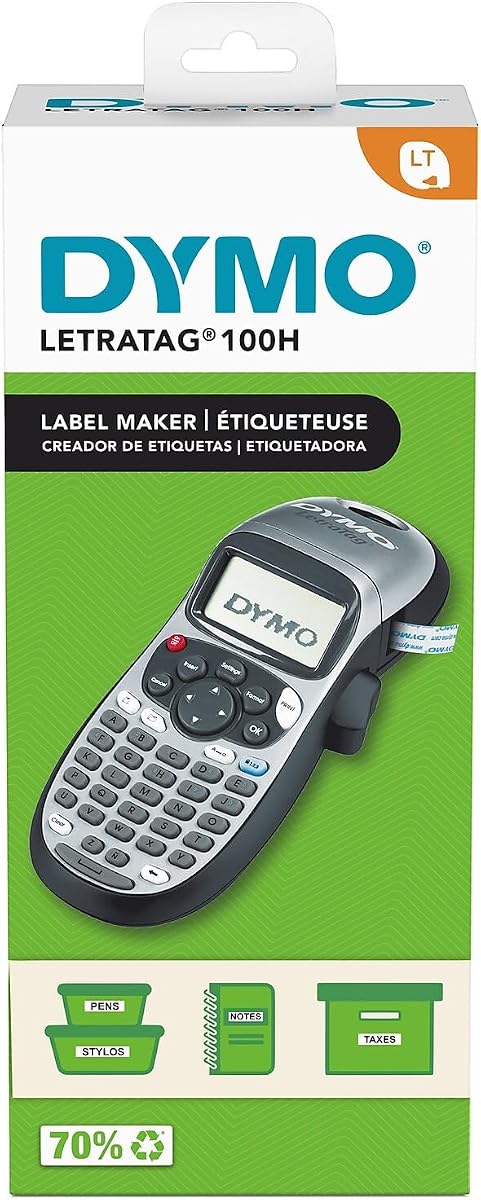
The DYMO LetraTag 100H Silver uses thermal printing to create clean labels without ink. Its compact design makes it highly portable and easy to store in a drawer when not in use for tasks.
We may earn a commission when you buy through this link, at no additional cost to you.
This model is great for general home and office needs where speed is key. The preview functionality ensures you see font effects on screen before printing to avoid costly mistakes or wasted tape.
Although it is a simpler unit it maintains the high standard of quality associated with DYMO. The silver finish adds a touch of style to the functional design appealing to users who appreciate aesthetics.
Ideal for those who want a reliable tool for quick tasks this model delivers consistent results. It is best suited for indoor use where extreme durability is not a primary requirement.
Thermal technology ensures clean prints without the mess or cost of ink cartridges or toners.
Auto-off functionality helps save power when the device is left idle during busy work sessions.
We may earn a commission when you buy through this link, at no additional cost to you.
The SUPVAN E12 features an LCD backlit display making it easy to read in both bright and low-light conditions. This is particularly useful for labeling in dark areas like basements or garages where visibility matters.
We may earn a commission when you buy through this link, at no additional cost to you.
It shares similar app capabilities with other models allowing extensive customization through the interface. The rechargeable battery and minimal margin printing contribute to cost efficiency and environmental friendliness over time.
The clear viewing on the backlit screen supports more efficient operation even in dim settings. While setting up the Bluetooth connection may take a moment it unlocks significant editing power later.
This model is perfect for users who need flexibility in where they work. The combination of display quality and app features makes it a versatile option for various labeling challenges.
The backlit screen ensures clear viewing of text and icons regardless of surrounding lighting conditions.
Rechargeable power eliminates the need for disposable batteries reducing waste and ongoing costs for users.
We may earn a commission when you buy through this link, at no additional cost to you.
The SUPVAN E10 is designed with laminated labels that are waterproof oil-proof and heat-resistant. These features make it ideal for kitchen and bathroom environments where moisture and cleanliness are top priorities for safety.
We may earn a commission when you buy through this link, at no additional cost to you.
The app does not require fees or registration allowing immediate access to editing tools. A built-in cutter simplifies the process by handling the cutting automatically saving time during labeling sessions.
Labels tear off without leaving residues which keeps your storage areas looking clean. The rechargeable battery lasts a full month on a single charge reducing the need for constant maintenance.
This device is a strong choice for household organization in wet or oily areas. Its affordability combined with specialized tape features makes it a practical investment for busy homes.
Laminated labels resist water and oil ensuring durability in kitchens and bathrooms where conditions vary.
No ink or toner is needed simplifying the process and reducing maintenance requirements for users.
We may earn a commission when you buy through this link, at no additional cost to you.
The Brother P-Touch PT-N20 combines portable and desktop features offering versatility for workshops or studios. Its extra expressive options include more font styles and frames than other Btag models for unique labels.
We may earn a commission when you buy through this link, at no additional cost to you.
Type comfortably on the full QWERTY keyboard and preview content on the 16-character display before printing. This larger screen helps avoid errors and ensures your vibrant messages are clear and legible.
The device allows for two lines of text with a combined height of 9mm which offers better readability. It is designed to be easy and effortless making it ideal for personal creative projects.
Use this device if you want a balance between portability and advanced features. It suits those who need a tool that can handle creative labeling tasks efficiently and effectively.
With 7 font styles and 15 frames you can create visually engaging labels that stand out on any item.
Save 10 labels in memory for quick reprinting of favorite designs without re-entering the data.
We may earn a commission when you buy through this link, at no additional cost to you.
The Brother P-touch PTH111 is a total workspace labeling solution designed for tough needs like electrical panels. One-touch keys simplify cable identification helping you organize work sites quickly and safely during projects.
We may earn a commission when you buy through this link, at no additional cost to you.
The lightweight design includes a detachable wrist strap making it easy to carry wherever your workspace is. It supports a variety of tapes widths and adhesives to handle diverse professional labeling requirements efficiently.
Use the graphical LCD screen to preview labels before printing to avoid errors. This device supports durability with laminated tapes that withstand harsh conditions ensuring your labels remain intact over time.
This is the right choice for professionals who need robust tools. Its combination of specialized keys and portable design makes it a powerful asset for any job site.
One-touch keys for cable wrap and faceplate simplify electrical identification tasks for professionals.
Laminated tapes ensure long-lasting labels that resist fading and peeling in demanding environments.
We may earn a commission when you buy through this link, at no additional cost to you.
Choosing the right handheld label maker involves balancing features like portability, durability, and connectivity to meet your specific organizational needs efficiently.
Different models support different tape types and widths. Some like Brother use proprietary tapes which ensure high durability but cost more. Others support standard sizes for flexibility. Check tape options before buying to avoid future issues.
Choose a model with tape options that fit your budget and durability needs.
Power options vary from batteries to rechargeable units. Rechargeable models reduce waste but may lack portability when the battery dies. Batteries offer convenience but require replacements. Consider how often you will use the device.
Select a power source that matches your usage frequency and portability requirements.
Modern devices may include Bluetooth for app editing. This allows for complex designs not possible on-device. However traditional models work independently without needing a phone. Decide if smart features are essential for your workflow.
Use connectivity if you need complex designs; otherwise standard models suffice for simple tasks.
Durability is key for labels in harsh environments. Look for laminated tapes and water-resistant features. Some models offer better build quality than others. Check ratings and materials to ensure longevity in your specific environment.
Prioritize durable tapes and builds for outdoor or high-use organizational settings.
A clear display helps avoid errors before printing. QWERTY keyboards make typing faster for large labels. Backlit screens are useful in low light. Evaluate the interface to ensure it supports efficient workflow.
Opt for a clear display and easy input method to streamline your labeling process.
User-friendly features like memory storage and preview screens save time. Simple interfaces are better for quick tasks. Complex devices may offer more features but take longer to learn. Balance complexity with your daily needs.
Choose features that simplify your workflow without adding unnecessary complexity or confusion.
High print quality ensures labels remain readable over time. Thermal printing avoids ink issues. Check if labels fade or smudge easily. Quality impacts how professional your organization looks and how long labels last.
Look for models that ensure clear, legible prints for long-term usability.
The initial device cost is only part of the investment. Consumable tapes add up over time. High-end models may cost more upfront but offer better value long term. Evaluate total cost of ownership.
Balance the upfront price with long-term costs for the best overall value.
Start by installing batteries or charging the device fully before the first use. Insert a compatible tape cassette firmly until it clicks into place. Ensure the tape is threaded correctly through the cutter mechanism to avoid jams.
Type your label text using the keyboard or app. Preview the output on the screen to check for errors or formatting issues. Select your desired font and size before pressing print to ensure the final result matches your expectations.
After printing, use the built-in cutter or the manual lever to trim the label cleanly. Store the device in a dry place away from extreme temperatures to maintain battery health and prevent tape degradation.
Most brands like Brother and DYMO recommend using authentic tapes for best performance. Using third-party options may result in jams or poor print quality. Check the device manual to see if alternative tapes are supported officially.
Battery life varies by usage. Standard alkaline batteries can last for hundreds of labels. Rechargeable models often provide a month of use per charge. Heavy users may prefer an AC adapter for continuous operation.
Yes but you need specific tape types. Look for laminated, water-resistant tapes that withstand fading and weather. Devices like the Brother P-Touch PTH110 are designed with durable tapes for outdoor conditions.
Most handheld models support standard tape lengths often up to 20 feet per cassette. Some models allow continuous printing depending on the tape size. Check the specifications for the maximum length per roll.
No, traditional models work standalone using on-device keyboards. Smart models with Bluetooth require a phone for full editing features. You can usually print basic labels directly on the device without an app.
Turn off the device and remove the tape. Use a soft cloth lightly dampened with alcohol to wipe the print head gently. Allow it to dry completely before reinserting tape to avoid smudging.
We reviewed ten top models highlighting their unique strengths for various organizational needs. From budget-friendly options to professional bundles each device offers specific benefits depending on your goals.
Prioritize durability and tape compatibility if you work in harsh environments. For home users consider connectivity and ease of use to streamline daily tasks effectively.
Prices change frequently so check current offers before purchasing. Investing in the right label maker ensures long-term efficiency and a well-organized space for years to come.