
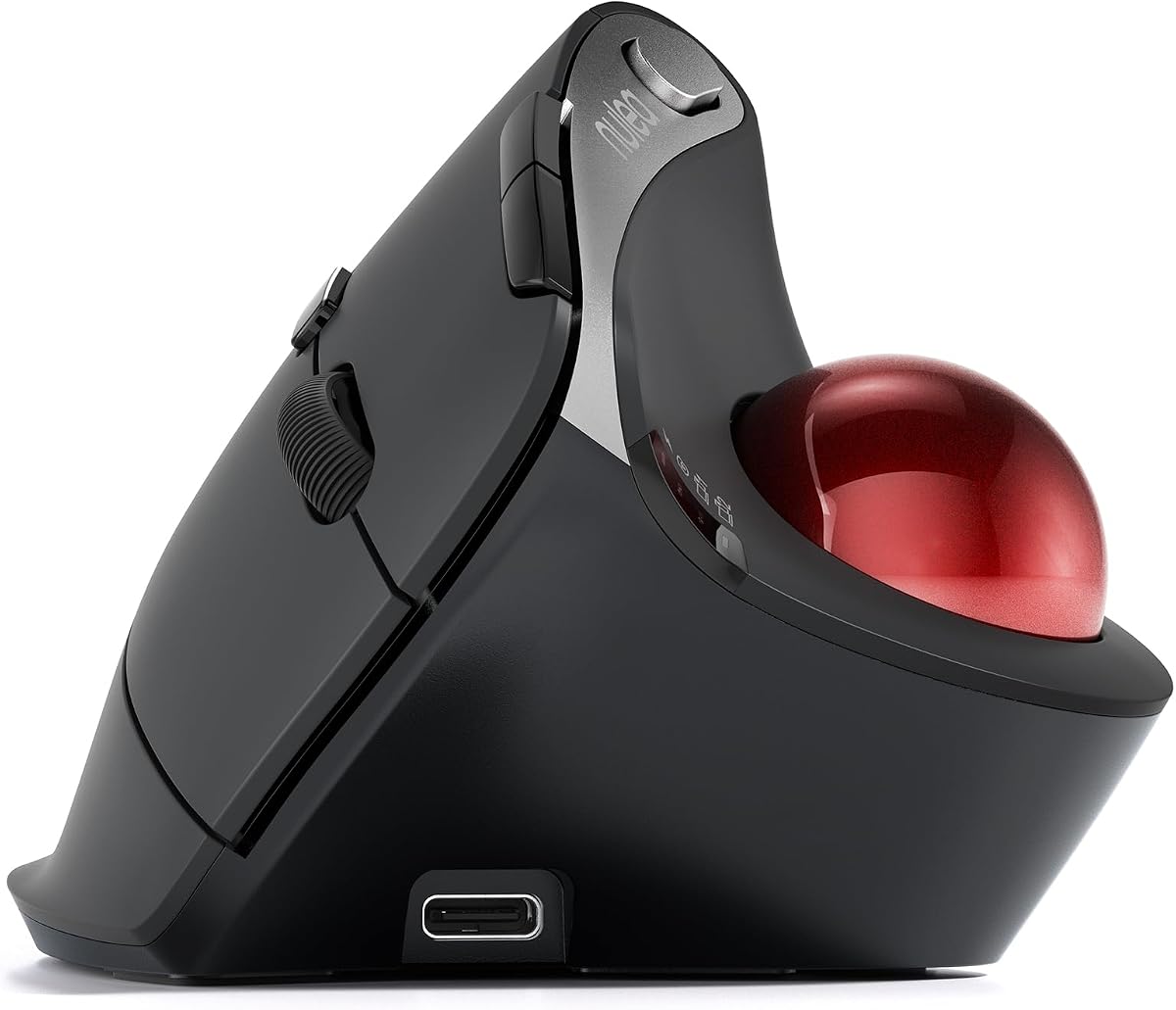
Nulea M501 Wireless Trackball Mouse
4.4Editor score
Rechargeable battery life
Three device connectivity
Adjustable DPI levels
This guide compares the top ergonomic trackball mice for comfort and precision. We review ten models including Logitech and Nulea to help you find the perfect
Finding the right input device can transform your daily workflow significantly. Ergonomic trackball mice offer a unique solution to reduce wrist strain while maintaining high precision. These devices allow you to control the cursor with your thumb or fingers without moving your hand across a surface.
We evaluated ten leading models based on comfort, connectivity, battery life, and tracking accuracy. Our analysis includes data from user reviews and technical specifications to ensure a balanced perspective. We focused on devices that support various hand sizes and work environments effectively.
Each pick highlights specific strengths like silent clicks, rechargeable batteries, or adjustable tilt angles. Prices and availability may change frequently so verify current details before purchasing. This guide helps you understand which features matter most for your specific ergonomic requirements and budget constraints.
4.4Editor score
4.5Editor score

4.4Editor score
This table provides a side by side look at the key specifications and features of all ten models reviewed. Compare connectivity options, battery types, and design angles to determine which device aligns best with your personal preferences and workspace setup requirements.




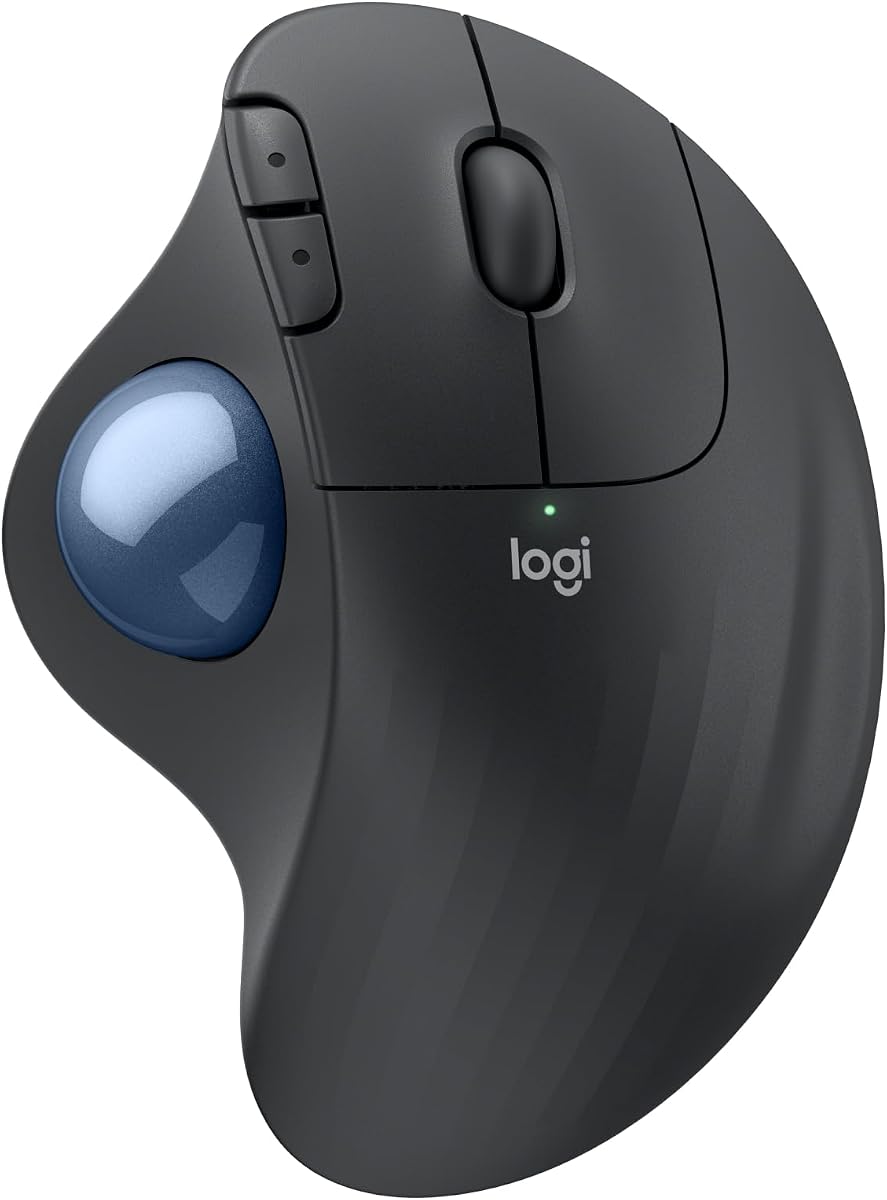
The Logitech Ergo M575S stands out as a top choice for users seeking comfort and reliability. With a 4.5 star rating it delivers smooth tracking and precise control for daily tasks. Its ergonomic design is certified by experts to support better forearm posture throughout the workday.
We may earn a commission when you buy through this link, at no additional cost to you.
This mouse features quiet clicks that reduce noise in shared spaces while maintaining tactile feedback. The thumb controlled trackball allows you to move the cursor without shifting your hand position. It connects via Bluetooth or a USB receiver and offers up to 18 months of battery life on a single AA cell.
While the AA battery is convenient some users might prefer a rechargeable option for environmental reasons. The size is optimized for average to large hands which may not suit everyone equally. However the tradeoff provides excellent stability and support for extended usage sessions.
Ideal for office workers and professionals who prioritize ergonomics and durability. This model balances performance with comfort making it a safe recommendation for most users. You will appreciate the reduced strain and enhanced productivity during long hours at your desk.
The sculpted shape realigns your forearm naturally which helps prevent fatigue. This design is tested by ergonomists to ensure it supports healthy hand positioning.
Switch between devices easily using the Logi Options plus app or manual toggles. The dual connectivity options ensure compatibility with various operating systems.
We may earn a commission when you buy through this link, at no additional cost to you.
The Nulea M501 offers exceptional value for users needing a reliable trackball without breaking the bank. Rated 4.4 stars it provides smooth navigation and ergonomic support for various desk setups. Its rechargeable battery eliminates the need for frequent replacements making it eco friendly.
We may earn a commission when you buy through this link, at no additional cost to you.
Connectivity is flexible allowing you to pair with up to three devices via Bluetooth or USB dongle. The adjustable DPI levels let you switch between precision and speed depending on your task. The thumb control mechanism reduces wrist movement and helps maintain a natural hand position all day.
Some limitations include non programmable buttons which restricts custom workflows for power users. Charging must be done via a standard USB port or 5V charger not fast chargers. Despite these minor issues the performance remains solid for everyday office and home use.
Perfect for students and budget conscious professionals seeking ergonomic benefits. This mouse delivers core features effectively while keeping costs low. You get a comfortable experience and long battery life without paying a premium price.
Seamlessly switch between your laptop tablet and desktop with a single button press. This feature enhances productivity across multiple workflows effortlessly.
Choose from four DPI settings to match your preferred cursor speed. This flexibility supports both detailed design work and general browsing tasks.
We may earn a commission when you buy through this link, at no additional cost to you.
This black version of the Logitech Ergo M575S maintains the same ergonomic excellence with a sleek aesthetic. Rated 4.6 stars it is highly praised for reducing muscle strain and improving forearm alignment. It uses thumb control to minimize hand movement which is ideal for tight workspaces.
We may earn a commission when you buy through this link, at no additional cost to you.
The mouse connects via Bluetooth or the included Logi Bolt USB receiver for stable performance. Battery life lasts up to 18 months on a single AA cell reducing maintenance frequency. The sculpted shape fits most hand sizes comfortably and supports relaxed typing and mouse usage.
One drawback is the reliance on replaceable batteries rather than internal rechargeable cells. The color palette is limited compared to other models which might not match all setups. Still the core functionality remains top tier for users focused on comfort and health.
Recommended for professionals wanting a proven ergonomic solution with minimal fuss. The design promotes better habits and reduces discomfort over time. You will benefit from the precision and support during long work sessions.
The ergonomic shape realigns your forearm into a better posture throughout the day. This helps prevent long term strain issues common with traditional mice.
Enjoy up to 18 months of battery life on a single AA cell. This longevity ensures consistent performance without frequent interruptions.
We may earn a commission when you buy through this link, at no additional cost to you.
The Logitech MX Ergo S represents the premium end of the trackball market with advanced features. Rated 4.4 stars it offers a 20 degree tilt to improve forearm posture and reduce muscle strain. The USB C charging provides quick power ups making it convenient for daily use.
We may earn a commission when you buy through this link, at no additional cost to you.
It includes six customizable buttons that work with Logi Options plus App for enhanced workflow automation. The thumb control allows switching between speed and high precision tracking instantly. Quiet clicks make it suitable for noise sensitive environments like shared offices or libraries.
The price is higher than other models reflecting its build quality and feature set. The large size may not fit smaller hands comfortably without adjustment. Still it delivers exceptional precision and comfort for power users needing top tier performance.
Ideal for professionals willing to invest in long term health and productivity. The adjustable tilt and rechargeable design offer superior flexibility. You will appreciate the enhanced control and reduced strain during complex tasks.
A 20 degree tilt angle improves forearm posture and reduces muscle strain by 27 percent. This design is certified for ergonomic benefits.
Use Logi Options plus to create time saving shortcuts and smart actions. Six programmable buttons let you tailor the mouse to your specific needs.
We may earn a commission when you buy through this link, at no additional cost to you.
This TECKNET model introduces a 16 degree vertical angle to further reduce muscle strain compared to flat trackballs. Rated 4.5 stars it promotes better forearm posture and offers silent clicks for quiet environments. The design is particularly useful for users experiencing wrist discomfort.
We may earn a commission when you buy through this link, at no additional cost to you.
Connectivity supports Bluetooth and 2.4G allowing instant switching between three devices. The built in 500mAh battery charges quickly and provides a full day of use on just 15 minutes. Five DPI levels ensure precise control across various tasks and screen sizes.
Some users may need one to two weeks to adapt to the vertical orientation and thumb control. The device dimensions are optimized for medium to large hands which limits accessibility for everyone. However the comfort benefits often outweigh the initial learning curve.
Best for those seeking specific vertical ergonomic features at a mid range price. The silent operation and fast charging add significant convenience. You will notice reduced strain and improved comfort during long sessions.
The 16 degree vertical angle keeps your palm in a natural position reducing strain by up to 50 percent. This helps maintain comfort throughout the workday.
A 15 minute charge powers a full day of use providing convenience. The 500mAh battery ensures long lasting reliability without frequent charging.
We may earn a commission when you buy through this link, at no additional cost to you.
The Nulea M506 features a pronounced 54 degree vertical design to keep wrists in a relaxed position. Rated 4.7 stars it is highly rated for comfort and steady cursor movement. The textured shell offers a secure grip ideal for office and creative work.
We may earn a commission when you buy through this link, at no additional cost to you.
All essential controls are within easy reach of your fingers reducing the need to shift your hand. The thumb controlled trackball significantly reduces wrist burden and prevents fatigue. The detachable ball allows for easy cleaning ensuring smooth operation over time.
Users may need time to adjust to the vertical layout and all fingertip controls. Battery life lasts up to 21 days on a single charge reducing maintenance needs. The design fits well for prolonged daily usage without frequent interruptions.
Perfect for users with wrist pain who need aggressive ergonomic support. The high rating reflects real world satisfaction with its design and comfort. You will benefit from the reduced strain and improved posture during tasks.
The 54 degree vertical structure keeps your wrists and forearms in natural relaxed positions. This design helps prevent fatigue during long work hours.
The trackball is removable for easy cleaning without tools. This keeps rolling smoothly and ensures precise cursor control all the time.
We may earn a commission when you buy through this link, at no additional cost to you.
This Nulea model uses a 65 degree ergonomic angle to keep your wrist naturally relaxed. Rated 4.3 stars it offers smooth control and silent operation suitable for quiet spaces. The sculpted shape fits your palm seamlessly for all day comfort.
We may earn a commission when you buy through this link, at no additional cost to you.
An infinite scroll wheel automatically switches between precise and fast modes based on your speed. This feature supports effortless navigation through long pages or documents with just a gentle spin. The thumb controlled trackball reduces hand movement and minimizes fatigue.
Some users report a steeper learning curve compared to standard mice. The scroll wheel behavior may take time to get used to for traditionalists. However the silence and ergonomic benefits make it a strong option for shared environments.
Ideal for those needing a quiet vertical mouse for late night or shared work. The scroll innovation aids productivity in document heavy tasks. You will appreciate the comfort and noise free performance during focused sessions.
The infinite scroll wheel switches modes based on speed for smooth navigation. This supports effortless movement through long pages with minimal effort.
Experience a completely noise free operation from trackball to buttons. Perfect for shared spaces or late night work without distractions.
We may earn a commission when you buy through this link, at no additional cost to you.
The Nulea Tilt Trackball includes a 21.7 degree tilt stand to elevate the mouse for a natural wrist position. Rated 4.4 stars it fits your palm precisely and delivers comfortable grip for long hours. Silent clicks make it suitable for quiet shared environments.
We may earn a commission when you buy through this link, at no additional cost to you.
Connectivity supports Bluetooth and USB receiver with instant switching between three devices. The thumb controlled trackball reduces hand movement and minimizes fatigue significantly. Four DPI levels offer precise control or faster movement based on your current task needs.
The tilt stand adds some footprint to your desk setup which may matter in small spaces. The large design is optimized for medium to large hands limiting broader accessibility. Still the ergonomic benefits and silent operation provide strong value.
Best for users needing a specific tilt angle to reduce wrist strain. The silent features and rechargeable battery add practical convenience. You will experience improved comfort and reduced noise during daily work.
The 21.7 degree tilt stand creates a more natural wrist position for comfort. This fits your palm precisely and delivers effortless grip.
Experience completely noise free operation from trackball to every button. Perfect for shared spaces or late night work without distractions.
We may earn a commission when you buy through this link, at no additional cost to you.
The Logitech Ergo M575 for Business is designed for scale with remote deploy capabilities for employees. Rated 4.4 stars it promotes better forearm posture and reduces muscle activity by 25 percent. The smooth thumb control offers precision on any surface for tight workspaces.
We may earn a commission when you buy through this link, at no additional cost to you.
It features up to 18 months of battery life on a single AA cell reducing maintenance. The plastic parts include 52 percent post consumer recycled plastic supporting sustainability goals. You can personalize shortcuts with the Logi Options+ app for specific workflows.
The enterprise focus might make it less accessible for individual consumers directly. Battery type is standard AA which is convenient but not rechargeable. Still the build quality and comfort features remain excellent for long term daily use.
Perfect for companies deploying ergonomic tools across multiple stations. The sustainability features and remote management add significant value. You will appreciate the reliability and comfort during extended work hours.
Remotely deploy and monitor employees with Logitech Sync for scale. This simplifies IT management and ensures consistent comfort across teams.
The plastic parts include 52 percent post consumer recycled plastic. This supports sustainability goals while maintaining ergonomic performance and comfort.
We may earn a commission when you buy through this link, at no additional cost to you.
This Pro version of the MX Ergo S adds an encrypted dongle for enhanced security on networks. Rated 4.5 stars it provides advanced control with a 20 degree tilt angle to reduce muscle strain. The USB C rechargeable design ensures consistent power without frequent replacements.
We may earn a commission when you buy through this link, at no additional cost to you.
Switch between speed and high precision tracking at the touch of a button for efficiency. The six customizable buttons increase productivity with time saving shortcuts and smart actions. Soft rubber grip and sculpted design suit medium to large hands for comfort.
The high price point reflects the premium features and build quality. The large size may not fit smaller hands comfortably without adaptation. Still the security and precision options make it a top choice for professionals.
Ideal for users needing high end performance and security features. The tilt and rechargeable design offer superior flexibility. You will appreciate the reduced strain and enhanced control during complex tasks.
The encrypted dongle ensures secure wireless connections for business environments. This protects your data while maintaining high precision tracking performance.
Six custom buttons allow you to tailor the mouse to your specific needs. This enhances productivity with shortcuts and smart actions for any task.
We may earn a commission when you buy through this link, at no additional cost to you.
Selecting the right ergonomic trackball requires careful consideration of several key factors to ensure comfort and productivity. This guide outlines the most important aspects to evaluate before making a purchase decision.
Look for a design that supports a natural hand position and reduces wrist strain. Vertical angles or tilt stands can improve forearm posture significantly compared to flat designs. Ensure the shape fits your hand size comfortably for all day usage.
Prioritize models with ergonomic certifications to guarantee health benefits and support.
Check whether the mouse supports Bluetooth, USB receiver, or both for flexibility. Multi device connectivity allows you to switch between computers easily without re-pairing. Ensure compatibility with your operating system for smooth operation.
Choose a model with stable connection to avoid lag during important tasks.
Decide between AA battery models and rechargeable ones based on your maintenance preference. Long battery life reduces interruptions and ensures consistent performance over time. Rechargeable units often offer quick charging features for convenience.
Select a power solution that aligns with your usage patterns and environmental goals.
Adjustable DPI levels let you switch between speed and precision for different tasks. High precision tracking is essential for design work while speed helps with navigation. Test the thumb control mechanism to ensure smooth cursor movement.
Pick a device with responsive tracking to match your specific workflow needs.
Programmable buttons can enhance productivity by allowing custom shortcuts and actions. Ensure the mouse offers software support for easy configuration of these buttons. Consider how many buttons you need for your specific applications.
More customization options mean greater efficiency in daily workflows and tasks.
Quiet clicks and silent operation are vital for shared office spaces or night work. Noise can be distracting to others and reduce your focus on tasks. Look for models specifically marketed with silent technology features.
Silent operation ensures comfort for everyone in your work environment.
Invest in a model made with durable materials that withstand long term use. Check for recycled plastic content if sustainability is a priority for you. A robust build ensures the device lasts through daily wear and tear.
High quality construction guarantees reliability and consistent performance over time.
To begin using your trackball mouse, insert the battery or charge the device fully. Connect it via Bluetooth or the included USB receiver and allow the system to recognize the hardware. Practice moving the cursor with your thumb to build familiarity with the motion.
Keep the trackball clean by removing it periodically to clear dust and debris. Most models allow easy removal without tools for maintenance. Wipe the interior and exterior surfaces with a soft cloth to ensure smooth operation.
Install manufacturer software to customize buttons and DPI settings for your needs. Adjust the cursor speed and shortcuts to match your workflow habits. Regularly update the software to ensure compatibility with your operating system.
Yes, ergonomic trackball mice reduce wrist movement by allowing thumb control. This can help alleviate strain associated with carpal tunnel syndrome. However, individual results vary so consult a specialist if pain persists.
Most trackball mice allow you to eject the ball easily without tools. Clean the ball with a soft cloth and wipe the interior cage of dust. Regular cleaning ensures smooth tracking and extends the device life.
Yes, trackball mice do not require a mouse pad or specific surface to function. They rely on internal sensors that detect ball movement. This makes them ideal for small desks or travel setups.
Battery life depends on usage and model type. Standard AA powered models can last up to 18 months on a single battery. Rechargeable models may offer weeks or months on a full charge depending on settings.
Yes, most users need one to two weeks to adapt to thumb control. The learning curve is normal and often leads to reduced strain long term. Patience during the adjustment period is key for success.
Absolutely, trackball mice connect via Bluetooth or USB making them perfect for laptops. They save desk space and allow control without moving your hand. This makes them ideal for small workstations or mobile use.
Most modern trackball mice are compatible with both macOS and Windows. Check the product details for specific driver support. Bluetooth connectivity usually ensures seamless pairing across operating systems.
Vertical trackball mice reduce wrist rotation and promote a handshake position. This design minimizes forearm strain and can improve posture significantly. Ideal for users experiencing discomfort with flat mice.
Choosing the right ergonomic trackball mouse depends on your specific comfort needs and workspace setup. Our top picks include the Logitech Ergo M575S for reliability and the Nulea M501 for budget friendly features. Each model offers unique benefits to suit different user preferences effectively.
Prioritize factors like tilt angle, battery life, and connectivity to match your daily workflow. Investing in comfort today prevents strain issues later and improves productivity. Consider your hand size and typical tasks before making a final decision.
Prices and availability change frequently so verify current details before purchasing. Check for any promotions or bundles that might offer better value. We hope this guide helps you find the perfect ergonomic trackball for your needs.