
NETGEAR PR60X
4.2Editor score
10G Multi-Gigabit Port
Cloud Managed Pro Router
Secure Remote Access
This guide compares the top ten dual wan router models for reliability, security, and performance to help you choose the right network solution for your
In today's connected world, maintaining a stable internet connection is critical for businesses and home offices alike. A dual wan router allows you to connect multiple internet sources, ensuring that if one link fails, your network stays online without interruption. This redundancy is essential for modern operations where downtime can lead to significant losses and frustration.
We have analyzed the leading models on the market to identify the best options for various needs. Our comparison focuses on key features like failover capabilities, security protocols, port configurations, and ease of management. By evaluating real-world performance data and user feedback, we aim to provide a clear and unbiased overview of what each device offers.
Each pick in this list highlights specific strengths such as budget-friendliness, enterprise-grade security, or advanced load balancing. You will find detailed breakdowns of pros and cons to help you make an informed decision. Please note that product availability and pricing can change frequently, so always check the latest details before purchasing.
4.2Editor score

4.4Editor score

4.4Editor score
The following table provides a side-by-side comparison of the ten top-rated dual wan router models. It highlights their key specifications to help you quickly identify the device that best matches your network requirements and budget constraints.



The TP-Link ER605 stands out as a reliable choice for small businesses needing robust connectivity. With a rating of 4.4 stars, users appreciate its straightforward setup and consistent performance. It is designed to handle multiple internet lines efficiently ensuring that your network remains stable even when one provider experiences issues.
We may earn a commission when you buy through this link, at no additional cost to you.
This device features five Gigabit ports including one dedicated WAN and two flexible WAN/LAN ports. This flexibility allows you to customize your network topology to suit specific needs. The advanced firewall policies and DoS defense mechanisms provide a solid layer of protection against common cyber threats.
While it lacks built-in Wi-Fi, this trade-off is acceptable for users who prefer dedicated access points for wireless coverage. The focus on wired stability and security makes it ideal for office environments. You can connect a 4G/3G modem via USB for backup, adding another layer of redundancy to your setup.
If you need a dependable gateway that prioritizes uptime and security, this router is an excellent choice. It offers the essential features required for professional networking without unnecessary complexity. We recommend it for small offices or home labs where wired connections are the primary concern.
The router automatically switches to a backup connection if the primary one fails, minimizing downtime for critical tasks.
Supports multiple VPN protocols including IPsec and OpenVPN allowing secure remote access for employees.
We may earn a commission when you buy through this link, at no additional cost to you.
The Peplink B-One is designed for enterprise branch offices that require blistering 1Gbps speed and seamless connectivity. It offers a robust network architecture that keeps you online even if your primary internet goes down. Users report unparalleled stability which reduces the need for frequent resets often experienced with other routers.
We may earn a commission when you buy through this link, at no additional cost to you.
Its SpeedFusion technology works with your existing Internet to create a smooth experience for video calls and data transfers. The router integrates easily with services including Starlink, Cable, DSL, and Fiber allowing for versatile connectivity options. This adaptability makes it a strong candidate for businesses in areas with varied ISP options.
Automatic firmware updates keep your network secure and running at peak performance without manual intervention. However, the higher price point reflects its enterprise-grade capabilities which might be overkill for small home setups. The complexity of features requires some network knowledge to fully leverage its potential.
For organizations needing a reliable central hub that combines wired and wireless capabilities, this router delivers. It balances high performance with essential security features ensuring your branch operations continue smoothly. It is a premium investment that pays off in stability and speed for demanding environments.
You can effortlessly connect multiple Starlinks or load balance cable fiber with Starlink satellite for maximum reliability.
Firmware updates happen automatically keeping security patches current without requiring administrator attention.
We may earn a commission when you buy through this link, at no additional cost to you.
The NETGEAR PR60X offers high-performance hardware with a configurable 10G/Multi-Gigabit port ideal for fast backhaul. It supports dual WAN ports with failover and load balancing to ensure reliable seamless connectivity for demanding networks. The ability to optimize network performance and security with up to 32 VLANs provides significant flexibility for segmentation.
We may earn a commission when you buy through this link, at no additional cost to you.
Remote network access is secure via IPSec Site-to-Site and Client-to-Site VPN along with OpenVPN and WireGuard. This supports up to 100 client device connections and 30 VPN tunnels making it suitable for growing teams. It integrates with NETGEAR Pro WiFi Access Points for a unified enterprise network solution.
NETGEAR Insight allows for remote network management anytime from anywhere including a 1-year subscription. While this adds convenience, ongoing subscription costs may be a consideration for long-term budgeting. The hardware itself is robust and built for professional environments that demand top-tier speed and control.
This router is a top choice for businesses that need 10G capabilities and cloud management capabilities. It simplifies administration while maintaining strict security standards for data protection. If you require scalable infrastructure with advanced control this model delivers the necessary tools and performance.
Manage up to 32 VLANs to segregate traffic and improve security across different departments.
The 10G port allows for ultra-fast data transfer speeds essential for large file operations.
We may earn a commission when you buy through this link, at no additional cost to you.
The Cudy R700 provides Multi-WAN Business Continuity allowing you to connect up to 5 ISPs with automatic failover. If one connection drops, traffic instantly reroutes to keep your business or remote office online. This affordability is impressive given the feature set it offers for small budgets.
We may earn a commission when you buy through this link, at no additional cost to you.
Full OpenWRT support unlocks VLAN segmentation, advanced firewall rules, and community-developed packages for professional-grade management. It includes a complete VPN Gateway Suite with WireGuard, OpenVPN, and IPsec built-in for secure connections. You can host site-to-site tunnels or route specific VLANs through encrypted VPN connections easily.
The Web GUI or Cudy App cloud management with TR-069 support makes deployment flexible for various environments. Built-in diagnostic tools like Ping and Traceroute help with rapid troubleshooting anytime you need it. However the basic interface may require some learning curve compared to enterprise options.
For home labs or small businesses needing robust failover without breaking the bank, this is a great pick. It balances technical depth with ease of use offering significant value. We recommend it for those who want control and redundancy at a budget-friendly price point.
Unlock custom configurations and community packages for a tailored network management experience.
Built-in tools like Ping and Traceroute help identify issues rapidly without external tools.
We may earn a commission when you buy through this link, at no additional cost to you.
The Omada ER707-M2 features flexible port configuration with 2.5Gigabit WAN and WAN/LAN ports for high-bandwidth aggregation. It supports a maximum of 500,000 concurrent sessions and 1000+ clients making it ideal for crowded networks. This capacity ensures performance remains steady even with many devices connected simultaneously.
We may earn a commission when you buy through this link, at no additional cost to you.
Cloud Access via the Omada app brings centralized cloud management of the whole network from different sites. You can control all sites from a single interface anywhere anytime ensuring consistent policies across locations. The highly secure VPN supports up to 100 LAN-to-LAN IPsec connections for secure remote access.
Backed by a 5-years warranty and free technical support this router offers long-term peace of mind. The support is available from 6am to 6pm PST Monday to Friday providing reliable help when needed. However, integration works best with other Omada products which may limit mixing brands.
For businesses already using Omada gear, this router extends your network capabilities seamlessly. It is a robust solution for managing high traffic environments with centralized control. We recommend it for organizations needing scalability and long-term support commitments.
Handles up to 500,000 concurrent sessions ensuring stability in high-traffic environments.
Control multiple sites from one interface to simplify administration and policy enforcement.
We may earn a commission when you buy through this link, at no additional cost to you.
The ASUS RT-BE88U utilizes blazing-fast WiFi 7 tech boosting throughput up to 7200Mbps with Multi-Link Operation. It bolsters your wired network capacity up to 34G with one 10G SFP+ port and one 10G WAN/LAN port. This makes it a powerhouse for users needing extreme speed and modern connectivity standards.
We may earn a commission when you buy through this link, at no additional cost to you.
Establish always-on internet through AI WAN detection versatile WAN configuration options and a USB port ready for 4G LTE and 5G tethering. It uses a quad-core 2.6GHz 64-bit CPU to handle demanding applications without lag. The whole-home network powered by AiMesh ensures seamless connectivity for all devices easily.
Stay secure with commercial-grade AiProtection Pro powered by Trend Micro offering one-tap security scanning. You can easily establish up to five SSIDs with Guest Network Pro for easy IoT device setup and management. However this router is expensive and benefits mostly from users with compatible devices.
If you want the absolute latest wireless technology and wired speed in one box, this is it. It is ideal for power users or those preparing for future network upgrades. We recommend it for high-end home or small office setups that demand top performance.
Intelligently detects WAN status to maintain always-on internet with optimal configuration.
Powered by Trend Micro to provide commercial-grade security and scanning for all devices.
We may earn a commission when you buy through this link, at no additional cost to you.
The ASUS ExpertWiFi EBG15 is designed for easier-than-ever setup via web browser or the mobile app through Bluetooth. Each Ethernet port can be assigned to one or more VLAN IDs providing additional security for your business operations. It supports up to 3 WAN Ethernet ports with load balancing to optimize multi-line broadband usage.
We may earn a commission when you buy through this link, at no additional cost to you.
Commercial-Grade Network Security includes Safe Browsing and VPN features with a free-subscription ASUS AiProtection Pro. This includes an intrusion prevention system (IPS) and deep packet inspection to block malicious traffic effectively. Backup WAN for stable connectivity is supported via USB using a mobile phone hotspot for reliability.
While the hardware throughput is lower than premium models it excels in software security features. Users appreciate the convenience of managing security remotely through the app interface. However the lower rating suggests some users may find the performance or interface wanting compared to competitors.
For businesses prioritizing security over raw speed, this router is a strong contender. It offers enterprise-grade encryption and protection at an accessible price point. We recommend it for small offices needing advanced security without a complex deployment.
Block malicious traffic with deep packet inspection and virtual patching capabilities.
Use your phone to quickly configure the router without needing a computer.
We may earn a commission when you buy through this link, at no additional cost to you.
The D-Link DSR-250V2 extends your corporate network to homes or remote offices with enhanced security. It helps protect sensitive data using IPSec PPTP L2TP OpenVPN SSL and strong encryption like DES and AES. Made in Taiwan it follows TAA and NDAA standards for agencies and businesses under strict regulations.
We may earn a commission when you buy through this link, at no additional cost to you.
Dual WAN failover automatically switches to a backup internet source if the primary goes down minimizing disruptions to crucial tasks. Load balancing ensures optimized bandwidth for smoother more reliable performance. It is feature-rich hardware with up to 75 VPN tunnels and 50 IPsec tunnels for flexible connections.
Web-based and SNMP tools offer clear visibility and control reducing complex troubleshooting. It is supported by a Limited Lifetime Warranty providing long-term confidence in quality. However lower user ratings suggest some reliability or usability issues compared to newer models on the market.
For government or regulated businesses needing compliance features, this router fits the bill. It provides essential security and redundancy for remote work scenarios. We recommend it for users who prioritize compliance and long-term support over raw performance.
Meets TAA and NDAA standards ensuring trust for regulated and government entities.
Automatic failover ensures your remote workers stay connected without interruption.
We may earn a commission when you buy through this link, at no additional cost to you.
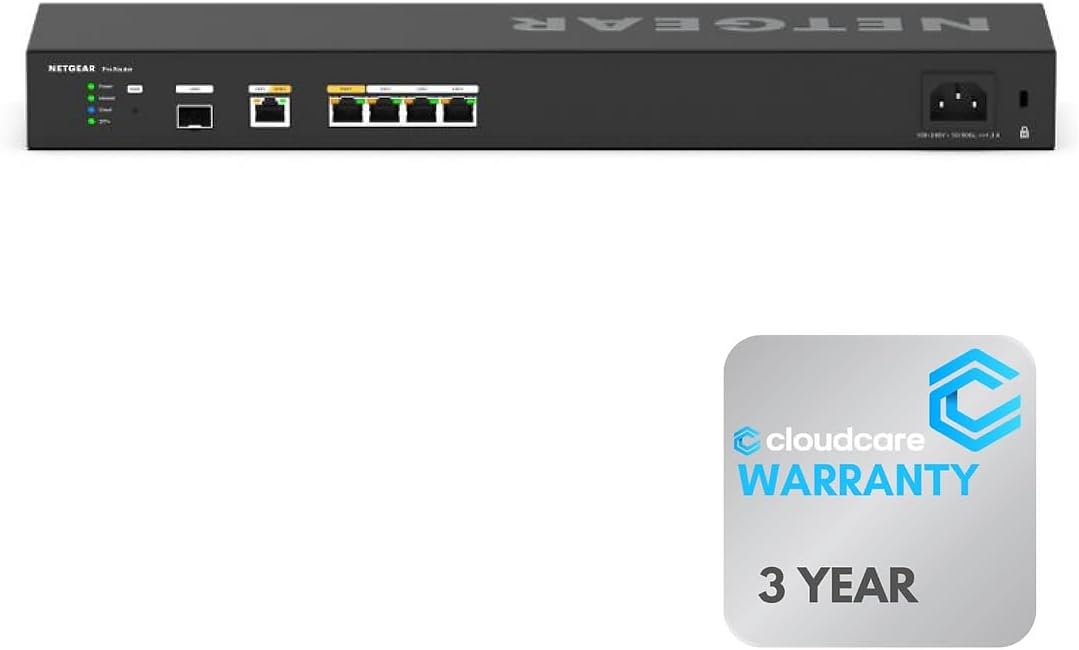
The Cloud Care NETGEAR PR60X offers six 10G/Multi-Gigabit ports for maximum speed and performance in your network setup. Ensure uninterrupted connectivity with two WAN ports allowing for load balancing and failover support for continuous internet access. The rack-mountable design saves space and organizes your equipment efficiently in professional environments.
We may earn a commission when you buy through this link, at no additional cost to you.
Manage and monitor your network remotely with NETGEAR Insight offering cloud-based control for easy setup. With Cloud Care's All-in-one Warranty SupportPlus you can have all products warrantied just by purchasing off their listings. This simplifies claims and support handling significantly for IT administrators and business owners.
This unit is specifically designed for desktop or wall-mount setups with a focus on organization. The high port count allows for direct connections to high-speed devices without extra switches. While premium it is a solid investment for those needing rack infrastructure and reliable support.
For professionals needing a clean and efficient rack setup this router delivers the necessary hardware. It combines performance with practical management features for better IT operations. We recommend it for offices requiring structured networking and reliable warranty support.
Save space with a design that fits neatly into standard professional rack environments.
All-in-one support plans streamline the process for handling hardware claims.
We may earn a commission when you buy through this link, at no additional cost to you.
The Linksys Business Dual WAN Gigabit VPN Router is feature-rich to meet a wide range of business network requirements. It supports load balancing and WAN failover for highly reliable Internet connectivity ensuring stable operations. You get up to 50 IPsec tunnels for site-to-site and client-to-site VPN connections easily.
We may earn a commission when you buy through this link, at no additional cost to you.
With a 900 Mbps firewall and 110 Mbps IPsec throughputs it handles standard business traffic well. It supports 5 OpenVPN tunnels for iOS and Android users for secure mobile access. While it lacks the complex features of enterprise routers it covers the basics efficiently.
This model is best for small businesses needing a straightforward VPN and failover solution. The user manual provides necessary troubleshooting steps though the interface is relatively basic. It serves well for teams that do not need deep customization or advanced routing.
If you need a reliable entry-level business router this unit provides solid performance. It offers essential connectivity features without overwhelming you with options. We recommend it for small offices or retail locations needing basic network redundancy.
Get up to 50 IPsec tunnels for secure and stable business communication.
Optimize your bandwidth by distributing traffic across multiple WAN connections.
We may earn a commission when you buy through this link, at no additional cost to you.
Selecting the right dual wan router requires understanding your network needs and technical constraints. This section breaks down the key factors to consider before making a purchase.
Check how many WAN ports the device offers. Some models have dedicated WAN ports while others have flexible ports that can switch between LAN and WAN. Ensure the count matches your planned number of internet providers.
Choose a model with enough ports to connect your primary and backup lines directly without needing extra switches.
Failover allows the router to switch to a backup line when the main one fails. Load balancing distributes traffic across lines to improve speed. Determine if you need one or both features for your use case.
Prioritize automatic failover to avoid downtime and load balancing if you have multiple high-speed connections.
Port speeds range from 1Gbps to 10Gbps. Check if you need 2.5Gbps or 10Gbps ports for future-proofing your network. Also check for SFP+ ports for fiber connections if required.
Select ports that match your ISP's maximum speed to avoid bottlenecks in your network throughput.
Look for built-in firewalls intrusion prevention systems and VPN capabilities. Enterprise routers often offer advanced encryption like IPSec or WireGuard. Ensure the device can handle the number of concurrent sessions your users need.
Choose a router with robust security protocols to protect sensitive data from external threats.
Some routers offer cloud management via mobile apps while others use local web interfaces. Cloud options simplify remote monitoring but may require subscriptions. Local interfaces give you direct control without recurring fees.
Decide if you need remote access for management or if local control is sufficient for your setup.
Many routers include built-in Wi-Fi while others require separate access points. If you want an all-in-one solution choose one with Wi-Fi 6 or Wi-Fi 7 support. For high density use external points are often better.
Evaluate whether you need wireless built-in or prefer dedicated access points for better coverage.
Prices vary significantly from budget models to enterprise gear. Check the warranty terms such as lifetime or multi-year coverage. A longer warranty can save money on future replacements or repairs.
Balance the initial cost with the expected lifespan to find a value that suits your finances.
Consider future needs when choosing a router. Models with OpenWRT support allow community extensions. USB ports for LTE modems add backup options for remote work or travel.
Select a model with expansion options like USB WAN ports for future proofing your network.
Connect your primary and backup internet cables to the WAN ports before powering on the device. Follow the setup wizard to configure the failover and load balancing settings according to your preference.
Place the router in a well-ventilated area to prevent overheating and ensure consistent performance. Keep firmware updated via the web interface to benefit from the latest security patches and features.
Regularly check the status logs to confirm that failover is working as expected. If a connection drops test the backup link manually to ensure redundancy is functioning correctly.
A dual wan router connects two internet lines from different providers to your network. It uses failover to switch to the backup line if the primary goes down. This ensures continuous connectivity for critical tasks.
If you rely on stable internet for work or business operations, it is highly recommended. It prevents downtime during maintenance outages or service interruptions from your main ISP provider.
Yes, some models support load balancing which splits traffic between connections. This can aggregate bandwidth for faster download speeds across the network.
The router detects the loss and automatically switches traffic to the backup line. This happens within seconds to minimize disruption for connected devices and users.
No, standard Ethernet cables work for most connections. Ensure they are Cat5e or Cat6 for Gigabit speeds depending on your ISP's requirements.
Yes, many routers have USB ports to connect a 4G or 5G modem. This is a common way to add cellular backup for offices without a second fixed line.
Access the router's web interface using a browser. Look for the firmware update section to download and install the latest version from the manufacturer.
Some routers offer optional cloud features for remote management. You can often run the device locally without a subscription if you only need basic routing.
We have reviewed ten top-rated dual wan router models ranging from budget-friendly options to premium enterprise gear. The TP-Link ER605 and NETGEAR PR60X stand out for their reliability and performance.
Prioritize failover capabilities and port speed based on your specific network needs. Choose a router that balances security features with ease of management for long-term satisfaction.
Always check the latest availability and pricing before purchasing to ensure you get the best deal. Network hardware evolves quickly so keeping an eye on updates is always a smart move.