
Nektar SE49
4.5Editor score
Affordable price point
DAW integration included
Compact lightweight design
Discover the top 49 Key MIDI Keyboards for production and performance. Our expert guide compares features, keybeds, and software for every budget today.
Finding the right keyboard can transform your music production workflow significantly. A 49 key MIDI controller offers the perfect balance between portability and playability for most producers and composers looking to expand their setup.
We have evaluated these models based on keybed quality, software integration, control layout, and overall value. Our team analyzed technical specifications and user feedback to ensure every recommendation meets professional standards for reliability.
Each pick highlights unique strengths like DAW integration or premium keybeds. Keep in mind that availability and pricing fluctuate frequently so verify current deals before making your final purchase decision for your studio.
4.5Editor score

4.7Editor score

4.4Editor score
This side-by-side comparison highlights the core specifications and unique selling points of each model. Reviewing these details helps you match the controller to your specific workflow needs and software environment.




The Novation Launchkey 49 MK4 stands out as a top tier controller for serious producers. It balances high-quality hardware with intuitive software integration to streamline your music production workflow effectively.
We may earn a commission when you buy through this link, at no additional cost to you.
Its FSR drum pads offer polyphonic aftertouch allowing you to trigger samples or sequences with dynamic control. The seamless mapping to major DAWs like Ableton and Logic saves time setting up tracks manually.
While the price is higher than budget options the build quality justifies the investment. The scale and chord modes make it easier for beginners to experiment with complex harmonies without music theory knowledge.
Choose this if you want a controller that grows with your skills. It offers the flexibility needed for professional work while remaining accessible enough for home studio users.
The control surface includes faders and knobs specifically mapped to common DAW functions for faster mixing.
Built in chord and scale modes help you avoid wrong notes and speed up songwriting.
We may earn a commission when you buy through this link, at no additional cost to you.
The Nektar SE49 is an ideal entry point for those entering music production on a strict budget. It provides essential MIDI controls without overwhelming users with complex features or high costs.
We may earn a commission when you buy through this link, at no additional cost to you.
Users appreciate the included DAW integration scripts that map transport and mixing controls automatically. This eliminates the need to spend hours configuring your controller to work with your recording software.
The build is functional but not premium which is expected at this price. While the keys are responsive they lack the weighted feel of higher end models found in professional studios.
If you need a reliable controller to start composing right now this is a smart pick. It removes financial barriers while giving you enough tools to learn and create effectively.
This model offers the lowest price point while still maintaining decent build quality and basic controls.
Plug and play functionality ensures you can start recording tracks immediately without driver issues.
We may earn a commission when you buy through this link, at no additional cost to you.
The Arturia KeyLab mk3 in white is a standout choice for users seeking both performance and aesthetic appeal. It combines a robust feature set with a sleek design that elevates the look of any studio.
We may earn a commission when you buy through this link, at no additional cost to you.
Aftertouch support allows for expressive playing where pressure after the initial key press modulates sound. This feature is crucial for adding emotion and dynamics to your electronic music productions.
The cost is significant compared to entry-level models but the hardware quality reflects the investment. The encoders and pads are tactile and responsive which improves the overall experience of using the controller.
Choose this model if you value high-end build quality and visual style. It is perfect for producers who want a premium tool that feels as good as it looks on camera.
Full aftertouch support gives you deeper control over sound modulation while playing notes.
USB-C power and data transfer ensure a reliable connection with modern computers and interfaces.
We may earn a commission when you buy through this link, at no additional cost to you.
The M-AUDIO Oxygen 49 MKV offers excellent compatibility with Native Instruments libraries through its NKS support. This makes it a top choice for users already invested in Komplete sound libraries.
We may earn a commission when you buy through this link, at no additional cost to you.
The layout includes eight knobs and nine faders that provide tactile control over virtual synths and effects. Auto-mapping works efficiently to assign these controls to your active parameters in your DAW.
While the chassis is plastic it feels durable and built to last through regular use. The keybed is full size and velocity sensitive providing a good playing experience for melodies.
Buy this if you rely on Native Instruments software and want seamless integration. It provides the tools needed for sound design and composition without requiring external mapping software.
NKS support allows instant browsing and control of preset parameters directly from the hardware.
Smart Chord and Scale modes simplify creating harmonic progressions quickly and intuitively.
We may earn a commission when you buy through this link, at no additional cost to you.
The M-AUDIO Oxygen Pro 49 distinguishes itself with a standard 5-pin MIDI output for connecting to hardware synthesizers. This feature is rare on modern USB controllers and expands your hardware integration options.
We may earn a commission when you buy through this link, at no additional cost to you.
It also features aftertouch which allows you to modulate sound parameters like filter cutoff after the key is struck. This adds a layer of expressiveness that helps your performances feel more human and dynamic.
The sixteen backlit pads are excellent for triggering clips or programming drum patterns. They are responsive and durable making them suitable for intense live performance or studio sequencing sessions.
Choose this if you own analog gear or need to control hardware synths. The combination of advanced MIDI features and solid build makes it a versatile tool for hybrid setups.
The dedicated 5-pin MIDI out port connects directly to external hardware synthesizers or drum machines.
Sixteen RGB pads offer clear visual feedback for clip launching and beat making tasks.
We may earn a commission when you buy through this link, at no additional cost to you.
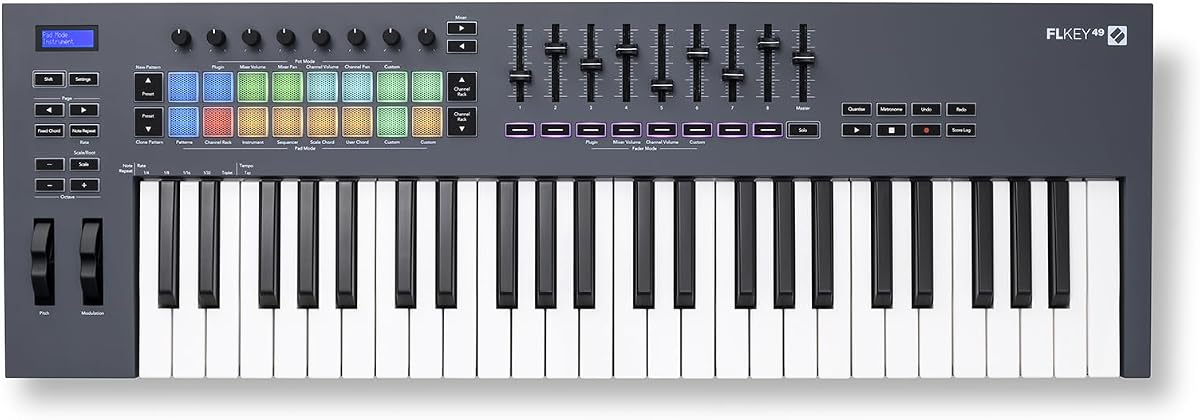
The Novation FLkey 49 is designed specifically for users of FL Studio and offers seamless integration out of the box. Every knob and fader maps directly to FL Studio mixer and channel functions without manual setup.
We may earn a commission when you buy through this link, at no additional cost to you.
The pads are highly customizable and can act as a step sequencer for programming beats. This allows you to switch between playing melodies and programming drum patterns instantly on the same surface.
While it works with other software the primary value is in its FL-specific features. If you live in FL Studio this controller removes the friction between your ideas and the software interface.
Buy this if FL Studio is your main DAW and you want total control. It turns your DAW into a hardware instrument allowing you to stay in the flow of creation.
Direct mapping to the Channel Rack allows for instant sample triggering and automation control.
Sequencer mode transforms the pads into a grid for quick beat programming and pattern creation.
We may earn a commission when you buy through this link, at no additional cost to you.
The Arturia KeyLab Essential mk3 is perfect for beginners who want a comprehensive package right out of the box. It includes Analog Lab V which offers thousands of sounds to start exploring immediately.
We may earn a commission when you buy through this link, at no additional cost to you.
The small LCD screen provides visual feedback on parameter changes which helps you understand what you are controlling. RGB backlit pads add a modern touch and help identify active notes or functions.
The keybed is light and easy to play but lacks the weight of piano keys. This is acceptable for electronic production where speed and portability often matter more than acoustic realism.
Choose this if you are starting your journey and need a versatile controller with software. It offers enough features to grow with you without being overwhelming or too expensive to learn.
Analog Lab V gives you instant access to a vast library of professional quality virtual instruments.
The compact display shows parameter values clearly so you can edit sounds with confidence.
We may earn a commission when you buy through this link, at no additional cost to you.
The M-AUDIO Keystation 49 MK3 is a stripped down controller that focuses purely on the core task of note input. It is ideal for users who want to play virtual instruments without getting bogged down in complex routing.
We may earn a commission when you buy through this link, at no additional cost to you.
It includes a single volume fader and transport buttons which are useful for basic control. The keys are velocity sensitive and feel decent for a controller in this price range and size class.
Because it lacks assignable knobs and pads it is less flexible for sound design. However for simple recording or composing tasks this simplicity can actually be an advantage for efficiency.
Buy this if you want a no-frills device that just works. It removes clutter from your desk and ensures your focus stays on the music rather than fiddling with settings.
A minimal control set reduces learning time so you can focus on composition instead.
Plug and play support means you can start using it immediately with most systems.
We may earn a commission when you buy through this link, at no additional cost to you.
The midiplus AK490 is an ultra basic controller suitable for those who need a simple input device without extra bells and whistles. It covers the essentials like velocity sensitivity and octave shifting effectively.
We may earn a commission when you buy through this link, at no additional cost to you.
Having a physical MIDI out jack is a distinct advantage for connecting to older hardware synth modules. This makes it a rare find in a market that has largely moved to USB-only connections for controllers.
Build quality is functional but basic so it may not withstand heavy touring or rough use. However for home studio use it provides all the necessary inputs to get started recording quickly.
Choose this if you want the lowest cost option with MIDI outputs. It is a practical solution for linking to older gear without spending money on features you do not need.
The 5-pin MIDI output supports connection to vintage synthesizers and drum machines directly.
Designed to be the most affordable option in the category for budget-conscious buyers.
We may earn a commission when you buy through this link, at no additional cost to you.
This generic 49-key controller is a budget focused option for users with very strict financial constraints. It provides basic MIDI input capabilities essential for recording simple ideas or practicing.
We may earn a commission when you buy through this link, at no additional cost to you.
The construction uses ABS material which offers reasonable durability against daily handling. It is designed to fit into small desktop spaces making it a candidate for cramped home studios.
There are no software bundles or advanced features included so you must provide your own software. It is strictly a hardware input tool without any creative assistance built into the controller.
Buy this only if you need a cheap keyboard for basic tasks. It serves as a placeholder that allows you to start making music while saving funds for future upgrades.
This controller is priced to make music creation accessible to anyone regardless of budget.
A simple design focuses purely on providing keys and basic connectivity without distractions.
We may earn a commission when you buy through this link, at no additional cost to you.
Selecting the right controller depends on your specific workflow goals and the tools you already own. We have outlined the critical factors to help you navigate the technical specifications effectively.
The keybed determines how the keyboard feels under your fingers during performance. Semi-weighted keys offer a balance between speed and resistance which is ideal for most electronic producers.
Look for velocity sensitivity to ensure your dynamics are captured accurately in your recordings.
Controllers with built-in integration for your Digital Audio Workstation save significant setup time. Features like transport mapping and mixer control allow you to stay hands-on while recording.
Always check if your preferred software is listed as supported on the manufacturers official specifications.
Knobs and faders allow you to tweak parameters without reaching for your mouse constantly. A dense layout helps you manage multiple effects and instrument parameters during a mix.
Ensure the number of controls matches the complexity of your typical projects and productions.
Pads are essential for drum programming and sample triggering in electronic music production. Look for backlit pads that respond to velocity for dynamic playing capabilities.
Check if the pads support polyphonic aftertouch for more expressive performance options.
Aftertouch allows you to modulate parameters after the initial key press for expressive depth. This feature is vital for creating evolving textures in synthesizer sounds.
Prioritize models with this feature if you plan to use virtual synthesizers heavily.
While USB is standard consider if you need a dedicated 5-pin MIDI output for hardware. This feature connects older gear that does not accept USB data transfer.
Also check for audio out ports if you want to monitor sounds directly from the controller.
Many controllers include free licenses for popular DAWs and virtual instruments. These can save you hundreds of dollars if you are setting up a new studio.
Verify that the included software versions are still supported by your operating system before buying.
If you travel to gigs or sessions the weight and material of the chassis matter significantly. Aluminum frames offer durability while plastic is lighter for easy transport.
Measure the physical dimensions to ensure the unit fits comfortably on your desk or stand.
Connect your keyboard to your computer using a standard USB cable and ensure the system recognizes it. Most modern systems will automatically detect the device and install necessary drivers without extra steps.
Place the keyboard on a stable surface to prevent slipping during intense playing. Use a controller stand if you need to save space or want a more ergonomic angle for playing.
Clean the keys and surface regularly with a soft dry cloth to remove dust and oils. Avoid using harsh chemicals that might damage the finish or the sensitive electronics inside.
MIDI keyboards do not produce sound on their own but send instructions to your computer. Audio keyboards have built-in speakers and sound generators that do not need a computer to make noise. MIDI is better for studio work while audio is better for standalone practice.
Most modern MIDI controllers are class compliant and work without installing drivers on Mac and Windows. However checking the product page for any specific software required for full feature access is recommended.
Yes 49 keys offer a good balance between portability and range for stage use. They are lighter than 88 key pianos but still provide enough keys for complex chord voicings and solos.
Yes many models support USB OTG which allows connection to Android or iOS devices. You may need a specific adapter depending on your phone or tablet port type.
Most brands include Lite versions of major DAWs like Ableton or Logic plus virtual instruments. The specific software varies by model so checking the product details is essential for confirming bundles.
Locate the sustain pedal jack usually found on the back of the controller and plug in the cable. Ensure the pedal is set to match the keyboard polarity so it registers correctly when pressed.
This usually means the volume is set high in your DAW or system settings rather than the keyboard. Lower the master volume in your software or use headphones for monitoring to avoid feedback.
Yes you can use a MIDI keyboard to trigger guitar amp plugin sounds just like any instrument. Simply assign a guitar tone plugin to a MIDI track in your DAW to route the notes.
We have reviewed ten top 49 key MIDI keyboards to help you find the perfect match for your needs. From budget options like the Nektar SE49 to premium choices like the Arturia KeyLab mk3 there is something for everyone.
Prioritize features that match your workflow such as DAW integration or keybed quality. Consider whether you need aftertouch or specific software bundles before finalizing your decision today.
Prices and availability change often so verify the current listings on the retailers websites. Investing in the right tool will significantly improve your productivity and enjoyment of music production.